Flux Kontext · Sketch to Image For Anime
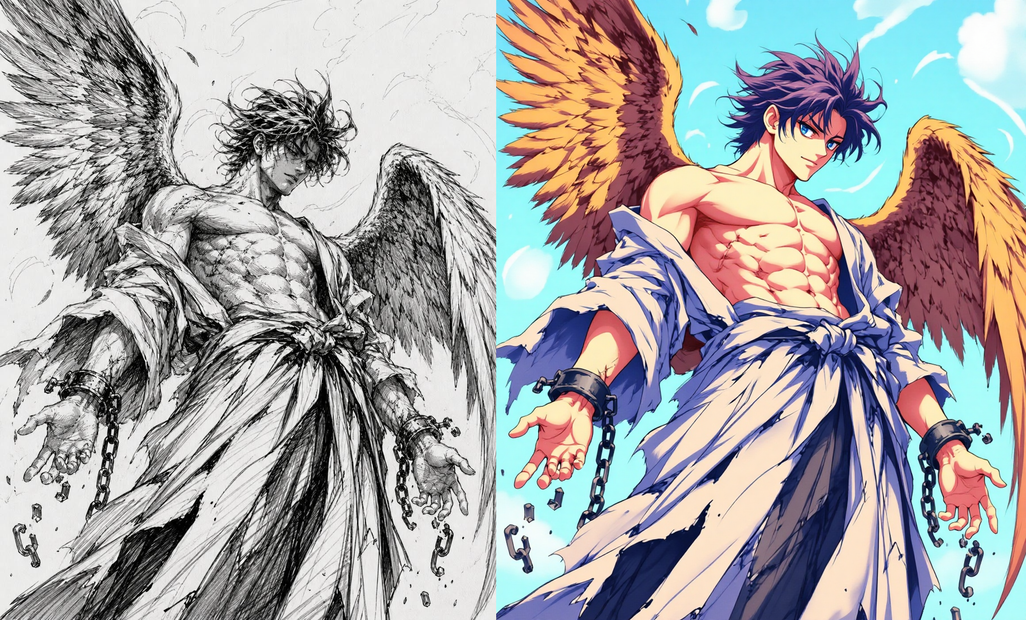
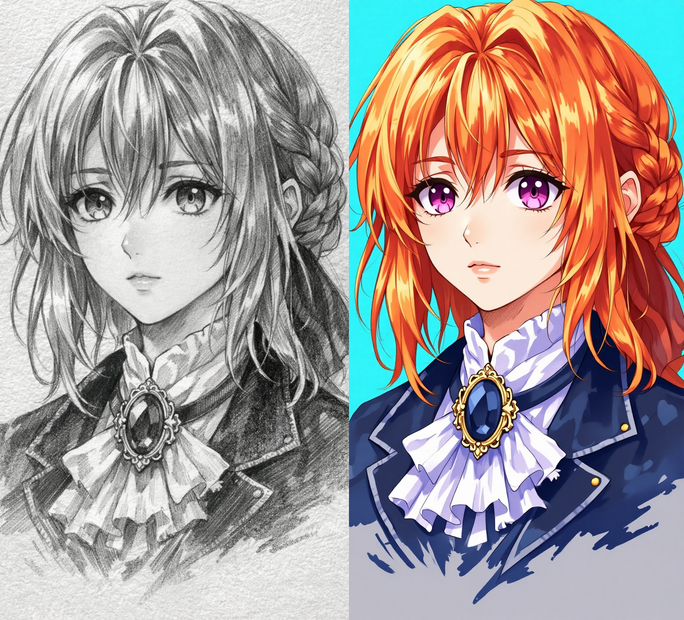
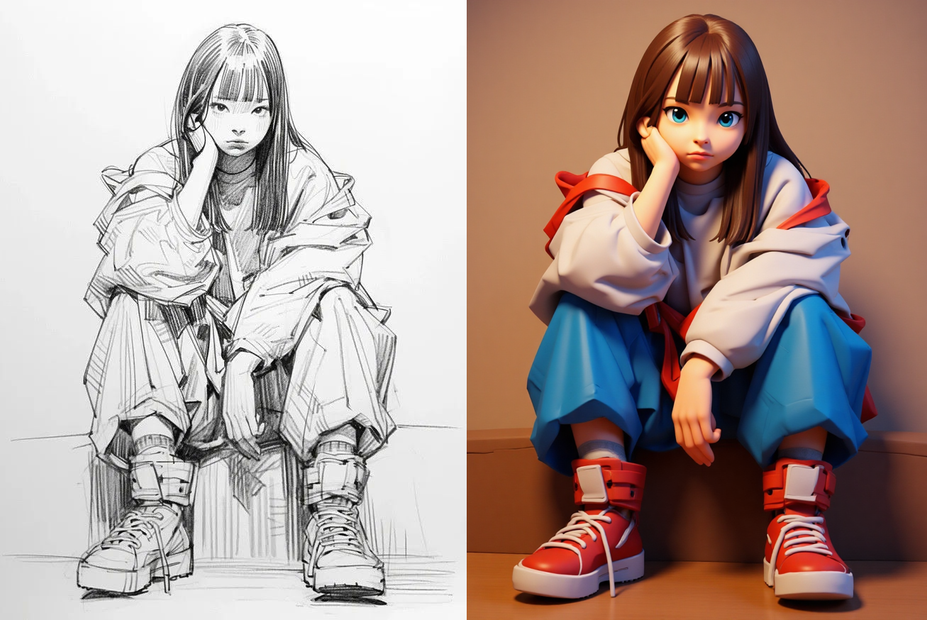
Upload a rough sketch and describe the target style. Flux Kontext reads the composition, pose, and layout from your drawing and renders it as a full-color illustration, anime character, game asset, or any visual style you describe.
character design
flux kontext
Image
image to image
lineart
sketch to image
263
_1783505933197.png?width=1400&height=620&quality=80&resize=contain)
_1783505933197.png?width=104&height=104&quality=80&resize=cover)

Nodes & Models
LoadImage
VAELoader
ae.safetensors
DualCLIPLoader
clip_l.safetensors
t5xxl_fp16.safetensors
Label (rgthree)
PreviewImage
UNETLoader
FLUX1/flux1-dev-kontext_fp8_scaled.safetensors
Note
CLIPTextEncode
ConditioningZeroOut
VAEDecode
KSampler
FluxGuidance
FluxKontextImageScale
VAEEncode
SaveImage
ReferenceLatent
ImageConcanate
FloyoStickyNote
ABOUT THE WORKFLOW
Turn a Sketch into a Finished Image
Upload a sketch, line drawing, or rough concept. Write a prompt describing the style you want the final image in. Flux Kontext reads the composition, character pose, and spatial layout from your sketch and renders it as a polished, full-color image in the described style. The output includes a side-by-side comparison of the sketch and the result. Change the style description in the prompt to get completely different looks from the same sketch.
Model
FLUX.1 Dev Kontext (fp8) by Black Forest Labs. A reference-conditioned image model that reads structure, pose, and layout from an input image and generates a new image guided by both the reference and the text prompt. Paired with dual CLIP-L and T5-XXL text encoders for strong prompt adherence.
HOW IT WORKS
Step 1. Upload your sketch
Any rough drawing, line art, wireframe, or concept sketch. Pencil on paper, digital line art, whiteboard photos, and tablet sketches all work.
Works great with: pencil sketches · digital line art · whiteboard drawings · concept doodles · wireframes
Step 2. Write your style prompt
Describe what the finished image should look like. "Turn the sketch into an anime character, full color" produces anime. "Turn the sketch into a photorealistic portrait" produces realism. "Turn the sketch into a game character with fantasy armor" produces game art. The style is entirely in the prompt.
Step 3. Hit run and download
Flux Kontext renders the sketch in the target style in 20 steps. The workflow saves the finished image and a side-by-side comparison.
Ready for: Photoshop · Figma · Clip Studio · Procreate · portfolio · print
First time? Upload a sketch and leave the prompt as-is ("Turn the sketch into an anime character, full color"). Hit run. Change the style after seeing the first result.
RECOMMENDED SETTINGS
Quick-start guide. Find the goal that matches yours and copy the settings.
Standard sketch to illustration — Default prompt, 20 steps, CFG guidance 2.5, seed randomized. Upload your sketch and run.
Different art style — Change the style target in the prompt. Replace "anime character" with "oil painting," "watercolor illustration," "pixel art sprite," "3D render," "comic book art," or "photorealistic portrait." The model follows the style description.
Preserve more of the sketch's exact lines — Raise the FluxGuidance value above 2.5. Higher guidance makes the output stick closer to the reference sketch. Lower guidance gives the model more creative freedom.
More creative interpretation — Lower the FluxGuidance toward 1.5. The model departs further from the sketch layout and adds its own compositional choices.
Explore variations — Keep the seed on randomize. Each seed produces a different interpretation of the same sketch and prompt. Lock the seed once you find a result you want to refine.
Output does not follow the sketch layout — Make the sketch clearer. Stronger, darker lines and more defined shapes give the model better structural cues. Very faint or ambiguous sketches produce looser interpretations.
Prompt: Start with "Turn the sketch into" followed by the target style. "Turn the sketch into a detailed anime character with cel shading, vibrant colors, and clean lineart" is specific. "Make it look good" is not. Add material, lighting, and color details to push the result further.
LEARN
📹 Videos
ComfyUI 101 Free Course ft. Sebastian Kamph
Floyo 101 for Team Collaboration
✨ Quick links
USE CASES
🎨 Character Design Pipeline
Sketch a character on paper or tablet, upload it, and render it in multiple art styles. Test anime, 3D, pixel art, and painterly versions of the same design from one drawing.
🎮 Game Art Concepting
Turn rough game character or environment sketches into polished concept art. "Turn the sketch into a fantasy RPG character with detailed armor and dramatic lighting" produces game-ready reference.
📚 Illustration and Storyboarding
Convert rough storyboard panels into finished illustrations. Each sketch becomes a full-color frame without redrawing.
📐 UI and Product Design Wireframes
Upload a UI wireframe or product sketch and render it as a polished mockup. "Turn the sketch into a clean mobile app interface with soft shadows and rounded corners" produces a visual reference from a rough layout.
WHAT WORKS BEST / WHAT TO AVOID
✅ Works great
Clear sketches with defined lines, shapes, and spatial layout
Prompts that specify the exact target style with visual detail
Character sketches with visible pose and proportions
Digital line art, clean pencil drawings, and ink sketches
⚠️ May produce softer results
Very faint or low-contrast sketches where lines are barely visible
Abstract scribbles with no recognizable form or structure
Prompts with no style direction ("make it nice")
Extremely detailed sketches where the model struggles to add value
FAQ
What is Flux Kontext?
Flux Kontext is a variant of FLUX.1 Dev by Black Forest Labs that accepts a reference image and a text prompt. It reads the structure, pose, and composition from the reference and generates a new image guided by both. In this workflow, the reference is a sketch, and the model renders it in the style described by the prompt.
Does the output follow the layout of my sketch?
Yes. Flux Kontext preserves the spatial layout, character pose, and compositional structure from the sketch. The FluxGuidance value (default 2.5) controls how closely the output follows the reference. Higher values stick closer to the sketch. Lower values allow more creative departure.
Can I use this for styles other than anime?
Yes. The style comes entirely from the prompt. "Turn the sketch into a photorealistic portrait," "Turn the sketch into a pixel art sprite," or "Turn the sketch into an oil painting in the style of a Renaissance master" all produce different results from the same sketch.
What kinds of sketches work best?
Any sketch with visible structure: pencil on paper, digital line art, whiteboard drawings, tablet doodles, and ink sketches. Stronger, clearer lines produce tighter results. Very faint or ambiguous marks give the model less to work with.
Can I use a photo instead of a sketch?
Yes. Flux Kontext accepts any image as a reference. A photo will produce a result that follows the photo's composition and subject while applying the style from the prompt. This effectively turns the workflow into a style transfer tool.
Is Flux Kontext licensed for commercial use?
FLUX.1 Dev Kontext is released under the FLUX.1 Dev Non-Commercial License for open-weight users. For commercial use, Black Forest Labs offers a separate Self-Hosted Commercial License. Check the current licensing terms on the Black Forest Labs site for your use case.
How to run sketch to image with Flux Kontext online?
You can run sketch to image with Flux Kontext online through Floyo. No installation, no setup, no local GPU needed. Open the workflow in your browser, upload your sketch, and hit run. Free to try.
WHY FLOYO?
Floyo is the only platform with team collaboration for ComfyUI in the browser. You run workflows with no install. You share run history, assets, and models across your team. You pay only when you generate. Floyo supports open-source and closed-source models.
A designer runs an edit and likes the result. A teammate opens that exact run from shared history and keeps going. No file handoffs. No version confusion.
For studios and enterprise teams, Floyo adds private workspaces, pooled resources, and a team usage dashboard. Other ComfyUI cloud tools run for one person at a time. Floyo runs for the whole team, with transparent per-generation costs.
Ready to try it?
Upload a sketch, describe the target style, and hit run.
Questions? Watch the free course or check the FAQ above.
Read more