Anima Preview 3 · Text to Image
Generate anime and illustration art with Anima Preview 3, the 2B model from CircleStone Labs and Comfy Org. Write a prompt in tags or plain text, hit run.
Anima2
character design
concept art
fantasy
Image
Text2Image
3.6k
_1774494463548.png?width=1400&height=620&quality=80&resize=contain)

_1774494463548.png?width=104&height=104&quality=80&resize=cover)


Nodes & Models
UNETLoader
anima-preview3-base.safetensors
CLIPLoader
qwen_3_06b_base.safetensors
VAELoader
qwen_image_vae.safetensors
EmptyLatentImage
ModelSamplingAuraFlow
CLIPTextEncode
KSampler
VAEDecode
PreviewImage
ABOUT THE WORKFLOW
Generate Anime and Illustration Art Write a prompt and get four pictures. Anima is built for anime characters, illustration styles, and artistic compositions. It reads both natural language and Danbooru tags, so you can prompt however you prefer. Four images per run at portrait orientation.
Model
Anima Preview 3 by CircleStone Labs with Comfy Org. Released 8 April 2026. A 2 billion parameter model built on NVIDIA Cosmos, paired with a Qwen 3 0.6B text encoder and the Qwen Image VAE. Trained on several million anime images and about 800K artistic images with no synthetic data. Still training; this is an intermediate checkpoint, not a final release.
HOW IT WORKS
Step 1. Write your prompt Describe the picture in natural language, Danbooru tags, or a mix of both. Both styles work. Works great with: anime characters · illustrations · fantasy scenes · concept art
Step 2. Hit run The model builds four pictures in 30 passes. All four appear in the preview.
Step 3. Download Right-click the preview to save any image you want. There is no automatic save step. Ready for: Photoshop · Figma · Clip Studio Paint · any editor
First time? Leave every setting as-is. The defaults (896 x 1152 · 4 images · 30 steps · CFG 4 · fixed seed) are the right starting point for almost everyone.
RECOMMENDED SETTINGS
Quick-start guide. Find the goal that matches yours and copy the settings.
Standard batch (most people) — 896 x 1152 · 4 images · 30 steps · CFG 4 · fixed seed. The right starting point for almost everyone.
Want only one image — Set batch size to 1. Faster and cheaper per run.
The picture drifts from your prompt — Raise CFG one point at a time. Higher values hold the model closer to your words, but push too far and the picture oversaturates.
Want a landscape — Swap width and height to 1152 x 896. Stay near one megapixel total.
Want a different take — Change the seed number. The default runs on fixed.
Want to use Danbooru tags — Write them comma-separated in the prompt: "1girl, long_hair, blue_eyes, school_uniform, cherry_blossoms, wind." Mix with natural language as needed.
Negative prompt — The default covers common quality issues. Add anything you keep seeing, like specific artifacts or styles you want to avoid.
Detail looks soft — Raise steps above 30. More passes add detail. The model is undistilled, so it keeps refining well past the default.
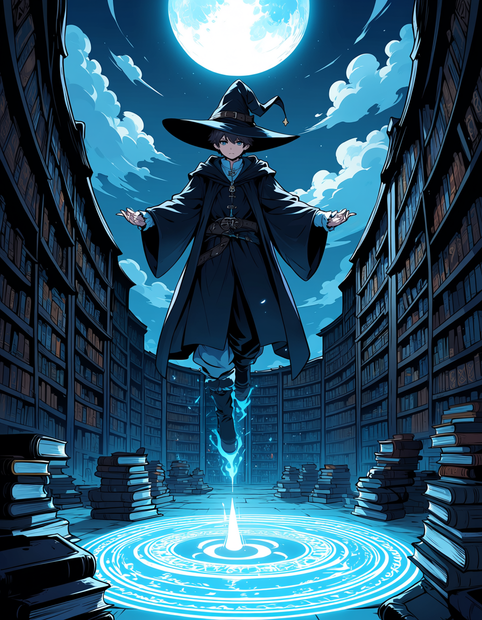
Prompt: Natural language and tags both work. "A teenage wizard in dark robes floats above a moonlit library, spell circles glowing, fantasy anime style" gives the same quality as "1boy, wizard, dark_robes, floating, library, moonlight, magic_circle, fantasy." Mix them for precision: "1girl, long black hair, sitting on a rooftop at sunset, city skyline behind her, soft wind, melancholy mood."
LEARN
📹 Videos
ComfyUI 101 Free Course ft. Sebastian Kamph
Floyo 101 for Team Collaboration
✨ Quick links
USE CASES
🎨 Anime Character Design Generate character sheets, poses, and expressions from descriptions or Danbooru tags.
📖 Illustration and Concept Art Build fantasy, sci-fi, and genre illustrations with detailed compositions and atmospheric lighting.
🎮 Game and Visual Novel Assets Produce character portraits, CGs, and scene art for games and interactive fiction.
🖼️ Fan Art and Portfolio Create polished anime art from a prompt for portfolios, commissions, or social posts.
WHAT WORKS BEST / WHAT TO AVOID
✅ Works great
Anime characters, costumes, and expressions
Fantasy and sci-fi illustration
Natural language prompts, Danbooru tags, or both
Atmospheric compositions with lighting and mood
⚠️ May produce softer results
Photorealistic output (the model is not built for it)
Fine hands and fingers at complex angles
Readable text in the image
High-resolution output past one megapixel
FAQ
What is Anima Preview 3? Anima Preview 3 is an intermediate checkpoint of the Anima model, released 8 April 2026 by CircleStone Labs in collaboration with Comfy Org. It is a 2 billion parameter text-to-image model built on NVIDIA Cosmos, trained on several million anime images and about 800K artistic images with no synthetic data. It is still training, and future releases will improve fine detail and aesthetics.
Does Anima understand Danbooru tags? Yes. The model reads both natural language descriptions and Danbooru-style tags. You can use either or mix them in the same prompt. Tags give precise control over character attributes like hair colour, clothing, and pose, while natural language handles scene descriptions and mood.
Can I use Anima output commercially? The licence makes a distinction. The model weights are under the CircleStone Labs Non-Commercial License, so hosting, distributing, or building services on the model requires a separate commercial licence. However, the generated images can be used commercially, including as concept art or assets for paid products like games and visual novels. Check the licence text for the full terms.
Is Anima a finished model? No. Preview 3 is an intermediate checkpoint. The model is still training and the final version will improve, especially for fine details and overall aesthetics. The official base release (Anima Base v1.0) followed on 15 May 2026 with improved consistency and a fine-tuned aesthetic variant.
What resolution does Anima support? The model works at resolutions between 512 x 512 and 1536 x 1536 pixels. This workflow ships at 896 x 1152, which is about one megapixel. Stay near that range for the cleanest output.
How does Anima compare to SDXL anime models? Anima is positioned as a migration target from SDXL-era anime models like Illustrious and Pony. It runs on the same PCs that can handle SDXL, understands both natural language and tags, and is built on a newer architecture (NVIDIA Cosmos) with better prompt adherence. The trade-off is that it is still training, and the ecosystem of LoRAs and extensions is smaller than SDXL's.
How to run Anima Preview 3 online? You can run Anima Preview 3 online through Floyo. No installation, no setup, no model downloads. Open the workflow in your browser, write a prompt, and hit run. Free to try.
WHY FLOYO?
Floyo is the only platform with team collaboration for ComfyUI in the browser. You run workflows with no install. You share run history, assets, and models across your team. You pay only when you generate. Floyo supports open-source and closed-source models.
A designer runs an edit and likes the result. A teammate opens that exact run from shared history and keeps going. No file handoffs. No version confusion.
For studios and enterprise teams, Floyo adds private workspaces, pooled resources, and a team usage dashboard. Other ComfyUI cloud tools run for one person at a time. Floyo runs for the whole team, with transparent per-generation costs.
Ready to try it? Write a prompt in tags or plain text and run it. Four images come back.
Questions? Watch the free course or check the FAQ above.
Read more