LTX 2.3 Face-Consistent Image to Video with VBVR
Turn a single portrait into vertical video with LTX 2.3. The VBVR LoRA holds face identity steady and gives motion the physical weight that I2V usually loses.
Image to Video
LTX2.3
3
6.8k




Nodes & Models
GetNode
KSamplerSelect
ManualSigmas
LoadImage
CheckpointLoaderSimple
ltx-2.3/ltx-2.3-22b-dev.safetensors
PrimitiveBoolean
PrimitiveFloat
INTConstant
RandomNoise
LTXAVTextEncoderLoader
gemma_3_12B_it_fp8_scaled.safetensors
ltx-2.3/ltx-2.3-22b-dev.safetensors
LTXVAudioVAELoader
ltx-2.3/ltx-2.3-22b-dev.safetensors
LatentUpscaleModelLoader
ltx-2.3-spatial-upscaler-x2-1.1.safetensors
EmptyLTXVLatentVideo
LTXVEmptyLatentAudio
LoraLoaderModelOnly
ltx-2.3-22b-distilled-lora-384.safetensors
Ltx2.3-Licon-VBVR-I2V-240K-R32.safetensors
SetNode
LTXFloatToInt
ImageResizeKJv2
easy cleanGpuUsed
Reroute
LTXVImgToVideoConditionOnly
easy showAnything
PreviewImage
GetImageSize
CLIPTextEncode
LTXVConcatAVLatent
LTXVPreprocess
LTXVConditioning
LTX2_NAG
CFGGuider
SamplerCustomAdvanced
LTXVSeparateAVLatent
LTXVLatentUpsampler
VAEDecode
VAEDecodeTiled
LTXVAudioVAEDecode
CR Prompt Text
MathExpression|pysssss
VHS_VideoCombine
VHS_VideoCombine
VHS_VideoCombine
LTX 2.3 image-to-video tuned for portrait clips where the face has to stay the same across every frame.
Upload a portrait, write a prompt for what the subject does, and the model generates a vertical video. The VBVR LoRA handles motion physics, so movements like turning, sitting, walking, and gesturing stay grounded instead of drifting. The distilled LoRA cuts steps without losing quality.
Outputs at 9:16 by default, then an LTX spatial upscaler and RTX Video Super Resolution take it the rest of the way to a clean export.
How do you generate face-consistent video from a single image with LTX 2.3?
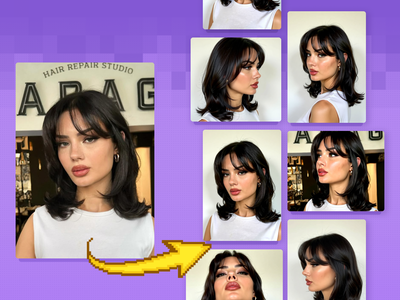
Upload a clear portrait. Pick a prompt template or write your own action description. Set the duration and run. The VBVR LoRA keeps motion physically plausible while LTX 2.3 holds the subject's face, outfit, and identity across the whole clip. A second pass upscales and sharpens before export.
Reference image A sharp, well-lit portrait. Front-facing or 3/4 angle works best. Heavy filters, hard shadows across the face, and motion blur all hurt identity consistency. Square or vertical framing is fine since the workflow handles resizing.
Prompt Describe the action sequence beat by beat. The workflow ships with multiple prompt templates: close-up beauty shots, full-body turns, sit-and-stand transitions, expression changes, and short-form social styles. Pick one and edit, or write fresh. Lead with identity anchors ("same woman, same face, same outfit") to reinforce consistency.
VBVR LoRA strength 0.5 by default. This LoRA does the heavy lifting on motion realism: weight, balance, natural acceleration. Want stronger motion grounding? Try 0.75. Push to 1.0 only when other tokens are simple. The catch: at 1.0, the LoRA starts colliding with the prompt and can override what you asked for.
Distilled LoRA strength 0.5 by default. Cuts inference time without degrading quality much. Drop it if you're generating with the full distilled checkpoint, since the LoRA is for the dev model.
Resolution 720x1280 (vertical HD) by default. The note inside the workflow lists 10 preset 9:16 resolutions from 720x1280 up to 1530x2720. 1080x1920 is the standard phone resolution. Pick what your VRAM and output target call for.
Duration and FPS 8 seconds at 30 FPS by default. Frame count auto-rounds to the LTX requirement (multiple of 8 plus 1). Want faster generation? Drop to 4-5 seconds.
i2v bypass Off by default, which means image conditioning is on. Flip it on if you want pure text-to-video without the reference image driving the first frame.
NAG settings LTX2_NAG handles negative anchor guidance. Defaults are tuned. Adjust only if you're running into specific artifact patterns and know what you're targeting.
What is LTX 2.3 face-consistent I2V good for?
Vertical short-form video where the same person appears throughout. Talking-head clips from a portrait, character animations, social-ready scenes built around a single reference. The face stays locked while the model handles camera movement, body language, and natural motion.
Concrete cases: turn a headshot into a 5-second clip of the same person walking and smiling. Animate a character portrait into a sit-stand-turn sequence for storytelling. Generate vertical clips for shorts, reels, or TikTok where face consistency across the cut matters more than camera complexity.
Where it falls short: identity drift still happens with low-quality reference images or extreme angle changes. Heavy occlusion (hands across the face, props blocking features) breaks the consistency the LoRA is enforcing. Need video without identity preservation? Use a base LTX 2.3 I2V workflow without VBVR.
The workflow uses Lightricks' LTX 2.3, the LiconStudio VBVR LoRA for motion reasoning, and the LTX 2.3 spatial upscaler plus RTX Video Super Resolution for final quality.
FAQ
What does the VBVR LoRA do in LTX 2.3 image-to-video? VBVR stands for video-based visual reasoning. It improves motion physics, identity consistency across frames, and how the model handles complex prompts with multiple actions. It reduces the floaty, weightless motion you sometimes get from base I2V, and keeps faces stable through turns and movement.
Why is my LTX 2.3 face changing across the video? Three common causes. The reference portrait is low-resolution or filtered. The prompt doesn't anchor identity ("same woman, same face") at the start. The VBVR LoRA strength is too low to enforce consistency. Try 0.75, add identity anchors to your prompt, and use a sharper reference image.
What resolution works best for LTX 2.3 vertical video? 720x1280 for fast iteration. 1080x1920 (FHD) for the final export, which matches the standard phone resolution most platforms expect. The workflow scales up through a spatial LoRA pass and RTX Super Resolution, so generating at 720 and letting the pipeline upscale produces clean 1080p without burning extra VRAM at the sampling stage.
How long can a single LTX 2.3 I2V clip be in this workflow? Default is 8 seconds at 30 FPS, which lands in the model's strong zone. Pushing past 10 seconds risks identity drift and motion incoherence. For longer narratives, generate multiple shorter clips with the same reference image and stitch them together in an editor.
How to run LTX 2.3 face-consistent I2V online? You can run LTX 2.3 with VBVR LoRA online through Floyo. No installation, no setup. Open the workflow in your browser, upload your portrait, pick a prompt template, and hit run. Free to try.
Read more