LTX 2.3 Pro Image to Video
LTX 2.3
API
Image to Video
LTX2.3
15
5.3k

_1776939889280.webp)
_1776939898889.webp)
_1776940630565.webp)

Nodes & Models
LTX23ProImageToVideo_floyo
VideoToFrames
LoadImage
WorkflowGraphics
VHS_VideoCombine
LTX 2.3 Pro image-to-video generation. Upload a still image, write a prompt describing the motion, and get a cinematic video.
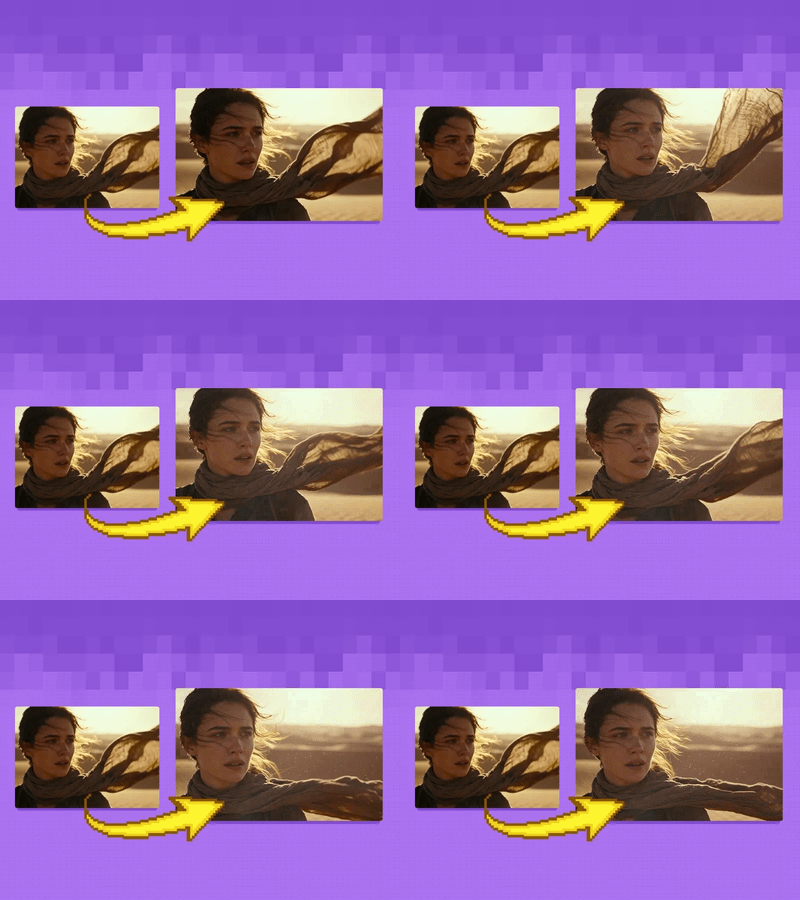
The model reads your image for composition, subject, lighting, and depth, then uses the prompt to animate it. Camera movement, environmental effects, particle dynamics, and subject animation are all prompt-controlled. Temporal coherence and consistency with the source image are strong compared to earlier versions. Output goes up to 2160p with audio generation built in.
Optionally upload a second image as an end frame to lock both the start and finish of the video, with the model filling in the motion between them.
How do you use LTX 2.3 Pro for image-to-video generation?
Upload a start image, write a prompt describing the motion and atmosphere, and run. LTX 2.3 Pro animates the scene from your image, guided by the prompt. Duration, resolution, aspect ratio, FPS, and audio generation are all configurable. An optional end image lets you control both the start and finish frame.
Start image The frame the video begins from. The model preserves the composition, subject, and visual structure of this image throughout the animation. Color, lighting, and spatial relationships carry through to the generated frames.
End image (optional) Upload a second image to define how the video ends. The model generates the motion between start and end frame, treating both as keyframes. Use this for controlled transitions: a character before and after a transformation, a scene in daylight and at dusk, a composition shift from one angle to another.
Prompt Describes the motion, atmosphere, and visual dynamics of the video. LTX 2.3 follows detailed, multi-part prompts accurately. The default prompt runs to three paragraphs covering an initial camera push, an escalating energy buildup with particle effects and lightning arcs, and a climactic transformation with volumetric fog and dramatic backlighting.
That level of specificity works. The model follows sequential motion instructions and builds toward a climax described in the prompt.
Duration (default: 6 seconds) Length of the generated video. 6 seconds is the default. Adjust based on the complexity of the motion you're describing. Longer durations give the model more frames to develop motion arcs and transitions.
Resolution (default: 2160p) Output resolution. 2160p is the default. The community has noted that the 2-step upscaling/refiner workflow produces significantly better motion and coherence than generating at full resolution in a single pass. For the cleanest results, generate at a lower resolution first and upscale separately.
Aspect ratio (default: auto) Auto reads the aspect ratio from your input image. Set manually for a specific output format.
FPS (default: 25) Frames per second for the output video. 25 is standard for cinematic output.
Generate audio (default: on) LTX 2.3 Pro generates ambient sound, environmental audio, and effects that match the visual content. On by default. Turn it off if you plan to add audio separately in post.
What are the best prompts for LTX 2.3 Pro image-to-video?
Describe motion sequentially as the scene develops. Name camera moves explicitly, describe environmental effects with specifics, and sequence lighting changes over time. End with technical style descriptors. LTX 2.3 follows multi-paragraph prompts accurately. More detail produces more controlled results.
Camera motion: name the move precisely. "The camera slowly pushes in from a side profile." "Smooth dolly left." "Crane shot rising above the treeline." Vague descriptions like "dynamic camera" produce inconsistent results.
Environmental effects: be specific about what's in the air and how it moves. "Light rain and floating embers drift through the air" works. "Atmospheric effects" does not.
Subject animation over time: describe what changes as the scene progresses, not a static state. "The warrior's eyes begin glowing, electricity spreads across his face and shoulders" tells the model a sequence. "Glowing eyes" tells it a state.
Lighting shifts: sequence them as the scene develops. "Lightning flashes softly in the background" early, "lightning bursting outward around him" at the peak.
Closing style tags: end every prompt with technical descriptors. "Ultra realistic lighting, cinematic atmosphere, smooth motion, detailed particles, volumetric fog, dramatic storm lighting."
The default prompt in this workflow is the best reference. It runs to three paragraphs and covers every element above. Copy its structure and swap the content for your subject.
What is LTX 2.3 Pro image-to-video generation good for?
LTX 2.3 Pro is strongest for cinematic animations from still images where you need controlled, directional motion: camera moves, environmental effects, particle dynamics, and atmospheric shifts. End-frame keyframe support makes it useful for controlled transitions. Motion and coherence are significantly better than LTX 2.1.
Cinematic scene animation. Take a character portrait, concept art piece, or environment render and animate it into a video clip. The model handles subtle motion (wind through hair, drifting particles) and dramatic motion (lightning bursts, energy effects) based on prompt direction.
Controlled transitions between two states. Use start and end frame inputs to define a visual transformation. A character before and after an emotional shift. A landscape from daytime to golden hour. The model generates the transition between both frames.
Pre-visualization and concept animation. Generate a moving version of a concept art frame for pitch decks, film pre-vis, or client presentations. The model adds motion to the existing composition rather than rebuilding it.
Environmental and atmospheric animation. Animate still photos of landscapes, architecture, and environments. Rain, fog, wind, and lighting shifts work well when described specifically in the prompt.
Honest notes: face consistency across frames is a challenge, particularly for stylized or cartoon subjects. Check character-focused outputs carefully and use the upscaling workflow for the final pass. The first frame can lose color and detail compared to the input; increase the image-to-video strength toward 1.0 to fix this. For complex audio sync, the community recommends kjnodes for finer audio layer control.
How does LTX 2.3 Pro compare to LTX 2.1 for image-to-video?
LTX 2.3 Pro has meaningfully better motion coherence and temporal consistency than LTX 2.1. Audio generation and end-frame keyframe support are new in 2.3. The quality improvement is most visible with the 2-step upscaling workflow. Generating without the refiner noticeably degrades results.
LTX 2.1 was faster and lighter but produced choppier motion and lower frame consistency. LTX 2.3 is the current recommendation for production-quality image-to-video. The 2-step workflow (generate at lower resolution, then upscale with the refiner) is the path to best quality. Generating at 2160p in a single pass works but produces weaker motion coherence.
For VRAM-constrained setups (8GB), LTX 2.3 runs with INT8 quantization and CacheDiT enabled. INT8 with native 30XX series support is faster than GGUF and the recommended path for lower-end hardware.
FAQ
What is LTX 2.3 Pro and how does it work?
LTX 2.3 Pro is an image-to-video model that animates a still image guided by a text prompt. Upload your image, describe the motion and atmosphere, and the model generates a coherent video. It reads composition, lighting, and depth from the image, then applies camera motion, environmental effects, and subject animation from the prompt.
How do I get better motion quality from LTX 2.3 Pro?
Use the 2-step upscaling/refiner workflow rather than generating at full resolution in a single pass. The community consistently reports better motion coherence and detail with this approach. Also write detailed, sequential prompts that describe how motion changes over time rather than describing a static visual state.
Can LTX 2.3 Pro generate audio with the video?
Yes. Audio generation is on by default. The model generates ambient sound and environmental audio matched to the visual content. Turn it off in the node settings if you plan to add audio separately in post.
How do I use keyframes in LTX 2.3 Pro image-to-video?
Connect a second image to the end image input. The model treats both the start and end images as keyframes and generates the motion between them. Use this for controlled scene transitions: a character transformation, a lighting change from day to night, or a composition shift between two specific states.
Why does the first frame of my LTX 2.3 Pro video lose color or detail?
This is a known issue with the image-to-video conversion. Increase the image-to-video strength toward 1.0 to preserve more of the source image's color and detail in the first frame. The 2-step upscaling workflow also helps recover detail across the full video.
How do I run LTX 2.3 Pro image-to-video online?
You can run LTX 2.3 Pro online through Floyo. No installation, no setup. Open the workflow in your browser, upload your image, and hit run. Free to try.
Read more