



他のユースケースを探す
すべて見る



スタイル変換のワークフロー一覧スタイル変換のワークフロー
すべての Workflows

Grok Imagine: Edit Images with a Text Prompt
Edit any image with a text instruction using Grok Imagine. Upload a picture, describe the change, and get a side-by-side comparison back in under a second.

Wan2.1 Fun Control and Flux for V2V Restyle
Create a new video by restyling an existing video with a reference image.
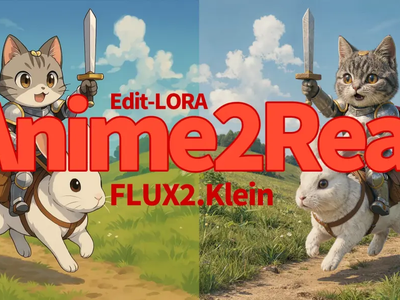

A2R for Klein
A2R Klein
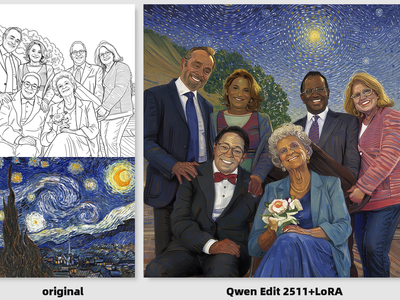
Qwen Image Edit 2511 + Style Transfer LoRA
Create new images from your lineart drawing or sketch using the style transfer LoRA and Qwen Image Edit 2511

Wan 2.1 Vid2Vid Style Transfer with Ditto
Upload any video, describe a new style, and Wan 2.1 rewrites every frame. Ditto keeps motion and structure intact across anime, Pixar, clay, and dozens more.
Wan 3.0 · Reference to Video
Re-render any video in a new visual style using Wan 3.0 by Alibaba. Upload a clip, describe the target look, and hit run. Motion preserved, audio included.


Wan 2.2 and Qwen for V2V Restyle
Create a new video by restyling an existing video with a reference image.

FLUX.2 Klein 9B · Image Editing With KV Cache
Edit images with Flux 2 Klein 9B in 4 steps. KV Cache speeds every run by reusing attention work across steps. Upload an image, describe the edit, hit Run.

LTX 2.3 IC LoRA Union Control - Video to Video
Restyle video with LTX 2.3 using IC-LoRA Union Control for structure guidance

Wan 2.7 · Image Editing
Edit any image with Wan 2.7 Unified, Alibaba's thinking-mode model. Upload a picture, describe the change, and preview the result. Thinking mode on by default.

Wan 2.7 Pro · Image Editing
Edit any image with Wan 2.7 Pro Unified, Alibaba's thinking-mode image model. Upload a picture, describe the change, and get a before-and-after comparison.

Z-Image Base · Text to Image With LoRA
Generate stylized images with Z-Image Base and a community LoRA. Write a prompt starting with the trigger word, pick a size, hit run. Apache 2.0 open weights.
Workflows = API
すべてのワークフローが API エンドポイントです。 バックエンドを作らずに、AI 生成を自社のプロダクトに組み込めます。 ワークフローを選んでカスタマイズし、「Floyo API スニペットをコピー」をクリックすれば完了です。

MCP
プラットフォーム上のすべてのワークフローに、自分のエージェントや社内ツールから、同じ管理設定のもとでアクセスできます。
mcp.floyo.ai/mcp
かんたんテンプレート
既製のワークフローを開き、説明を読んで入力を変え、Run をクリックするだけ。ほとんどの人はノードを開くこともありません。複雑な部分は、必要なときのために裏側にあります。

Trust Center
誰かが実行する前に、安全かどうかがわかります。すべてのモデルに Verified Private と Commercial Use のステータスがあり、承認していないモデルはチームの管理設定でブロックできます。管理者は、チームが使えるモデル、プロバイダー、ノードを選べます。

かんたんテンプレート
既製のワークフローを開き、説明を読んで入力を変え、Run をクリックするだけ。ほとんどの人はノードを開くこともありません。複雑な部分は、必要なときのために裏側にあります。
Trust Center
誰かが実行する前に、安全かどうかがわかります。すべてのモデルに Verified Private と Commercial Use のステータスがあり、承認していないモデルはチームの管理設定でブロックできます。管理者は、チームが使えるモデル、プロバイダー、ノードを選べます。
Workflows = API
すべてのワークフローが API エンドポイントです。 バックエンドを作らずに、AI 生成を自社のプロダクトに組み込めます。ワークフローを選んでカスタマイズし、「Floyo API スニペットをコピー」をクリックすれば完了です。
