Z-Image Turbo + SDA · Text to Image
Write a prompt and Z-Image Turbo generates a photorealistic image in 8 steps, with the SDA diversity LoRA ensuring each seed produces a distinct composition, pose, and camera angle. Output upscaled to 2048x2048.
diversity
photorealistic
sda
text to image
z-image turbo
0
22
_1782804789932.png?width=1400&height=620&quality=80&resize=cover)
_1782804794460.png?width=1400&height=620&quality=80&resize=cover)
_1782804798667.png?width=1400&height=620&quality=80&resize=cover)
_1782804789932.png?width=104&height=104&quality=80&resize=cover)
_1782804794460.png?width=104&height=104&quality=80&resize=cover)
_1782804798667.png?width=104&height=104&quality=80&resize=cover)

Nodes & Models
FloyoStickyNote
EmptySD3LatentImage
CLIPLoader
qwen_3_4b.safetensors
UNETLoader
z_image_turbo_bf16.safetensors
VAELoader
Z-Image_natural_vae.safetensors
CLIPTextEncode
LoraLoaderModelOnly
zit_sda_v1.safetensors
SaveImage
ModelSamplingAuraFlow
ConditioningZeroOut
VAEDecode
KSampler
ImageScaleBy
ABOUT THE WORKFLOW
Generate Images from Text
Write a prompt describing the image you want. Z-Image Turbo generates it in 8 steps with the SDA diversity LoRA applied, which ensures that changing the seed produces genuinely different compositions, poses, and layouts rather than near-identical variants. The workflow upscales the result 2x to 2048x2048 and saves it. That's it.
Model
Z-Image Turbo (6B, bf16) by Tongyi-MAI (Alibaba). A single-stream Diffusion Transformer distilled to 8 steps. Generates photorealistic images at near-production speed with strong prompt adherence and bilingual (English/Chinese) text rendering.
SDA Diversity LoRA v1 (strength 0.8) by F16. A Semantic Directional Alignment adapter that restores output diversity to distilled models. Without it, Z-Image Turbo tends to collapse toward a single "mean" composition per prompt. With it, each seed yields a distinct result.
HOW IT WORKS
Step 1. Write your prompt
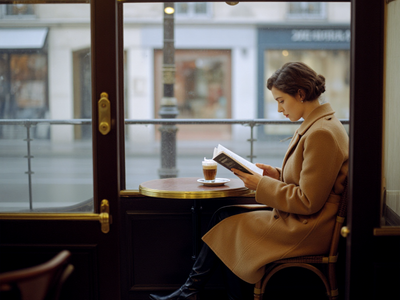
Describe the image: subject, setting, lighting, camera, lens, mood. The model responds well to photographic language. "Interior of a 1950s Parisian café, a woman in a camel wool coat reading a paperback, shot on Leica M11, 50mm Summilux, available light, slight film grain" gives it clear direction.
Works great with: portraits · scenes · product shots · architecture · concept art · cinematic stills
Step 2. Hit run
Z-Image Turbo generates at 1024x1024 in 8 steps, then the workflow upscales 2x to 2048x2048 using bicubic interpolation.
Step 3. Change the seed for variations
The seed advances automatically with each run. Each new seed produces a different composition, angle, and pose thanks to the SDA LoRA. Run several times and pick the strongest result.
First time? Leave every setting as-is. The defaults (8 steps, CFG 1, SDA at 0.8) are the right starting point for almost everyone.
RECOMMENDED SETTINGS
Quick-start guide. Find the goal that matches yours and copy the settings.
Standard generation (most people) — Write your prompt, hit run. Defaults handle everything. Change the seed for variations.
More diversity between seeds — Increase the SDA LoRA strength toward 1.0. Each seed will produce more dramatically different compositions. Trade-off: anatomy and fine detail may soften slightly at higher strengths.
More consistency between seeds — Lower the SDA LoRA strength toward 0.5. Compositions stay closer to the model's default mean, with subtler variation between seeds. Good for batch-generating minor variants of a single concept.
Bilingual prompts — Z-Image Turbo handles both English and Chinese prompts natively. You can write the full prompt in Chinese or mix languages. The model renders Chinese text in images accurately.
Hands or anatomy look off — The SDA LoRA trades some anatomical rigidity for diversity. Lower the LoRA strength to 0.5 to 0.6 for prompts where hands, fingers, or body structure matter most.
Want a different aspect ratio — The default is 1024x1024 (square). Adjust the resolution to 1280x720 (landscape) or 720x1280 (portrait) depending on your output target.
Prompt: Write like a photographer. Include the subject, setting, camera model, lens, lighting style, and film stock or grain. "Shot on Hasselblad X2D, natural window light, slight color negative grain" gives the model photographic anchors that sharpen the result. Vague prompts like "a nice photo of a woman" produce vague output.
LEARN
📹 Videos
ComfyUI 101 Free Course ft. Sebastian Kamph
Floyo 101 for Team Collaboration
✨ Quick links
USE CASES
📸 Photography-Style Image Generation
Generate photorealistic stills with specific camera, lens, and lighting descriptions. The model responds to photographic language better than most text-to-image models, producing results with plausible depth of field, grain, and color science.
🎨 Concept Art and Illustration
Generate diverse visual concepts from a single prompt by running multiple seeds. The SDA LoRA ensures each result has a different composition and angle, giving you a range of options to choose from or build on.
🛍️ Product and E-commerce Visuals
Generate product mockups and lifestyle shots from text descriptions. The 2048x2048 upscaled output is print-ready for catalogs, social media, and web.
🌏 Bilingual Content Creation
Write prompts in English, Chinese, or both. Z-Image Turbo renders text in images accurately in both languages, making it useful for multilingual marketing and design work.
WHAT WORKS BEST / WHAT TO AVOID
✅ Works great
Detailed photographic prompts with camera, lens, and lighting references
Scene descriptions with clear spatial relationships and mood
Running multiple seeds to explore diverse compositions
Portraits, environments, and product shots
⚠️ May produce softer results
Very short or vague prompts with no visual anchors
Complex multi-character poses requiring precise anatomy
SDA LoRA at full strength (1.0) for scenes demanding rigid body structure
Extremely specific text rendering in small font sizes
FAQ
What is Z-Image Turbo?
Z-Image Turbo is a 6-billion-parameter text-to-image Diffusion Transformer by Tongyi-MAI (Alibaba). It is distilled to 8 inference steps using the Decoupled-DMD algorithm, making it one of the fastest production-grade image generators available. It handles prompts in both English and Chinese and can render text accurately in images in both languages.
What does the SDA diversity LoRA do?
Distilled models like Z-Image Turbo tend toward "mode collapse," where different seeds produce nearly identical compositions for the same prompt. The SDA (Semantic Directional Alignment) LoRA by F16 rotates the model's velocity field to restore diversity. With SDA applied, each seed gives you a genuinely different pose, camera angle, and layout, so generating multiple variations is productive rather than redundant.
Why is the SDA LoRA set to 0.8 and not 1.0?
There is a trade-off between diversity and anatomical precision. At 1.0, compositions vary more aggressively, but fine structures like hands and fingers can soften. 0.8 is the default balance point. Lower it toward 0.5 for tighter anatomy, raise it toward 1.0 for maximum variation.
What resolution does this workflow output?
The model generates at 1024x1024, then the workflow upscales 2x using bicubic interpolation to 2048x2048. You can change the base resolution for different aspect ratios before upscaling.
Can I stack other LoRAs with the SDA LoRA?
Z-Image Turbo supports multiple LoRAs. However, the SDA LoRA works by rotating the model's velocity field, which can conflict with other LoRAs that expect the original trajectory. If you stack, try lowering the SDA weight to 0.5 to 0.7 to reduce conflicts.
Is Z-Image Turbo licensed for commercial use?
Z-Image Turbo is released by Tongyi-MAI (Alibaba). Check the current license on the Hugging Face model page for your specific use case. The SDA LoRA by F16 is a community adapter with its own license terms.
How to run Z-Image Turbo online?
You can run Z-Image Turbo online through Floyo. No installation, no setup, no local GPU needed. Open the workflow in your browser, write your prompt, and hit run. Free to try.
WHY FLOYO?
Floyo is the only platform with team collaboration for ComfyUI in the browser. You run workflows with no install. You share run history, assets, and models across your team. You pay only when you generate. Floyo supports open-source and closed-source models.
A designer runs an edit and likes the result. A teammate opens that exact run from shared history and keeps going. No file handoffs. No version confusion.
For studios and enterprise teams, Floyo adds private workspaces, pooled resources, and a team usage dashboard. Other ComfyUI cloud tools run for one person at a time. Floyo runs for the whole team, with transparent per-generation costs.
Ready to try it?
Write your prompt and hit run. The model, LoRA, and upscaler are already configured.
Questions? Watch the free course or check the FAQ above.
Read more

_1783065533774.png?width=400&height=300&quality=80&resize=cover)
_1783028563354.gif?width=400&height=300&quality=80&resize=cover)