

Moonvalley Marey Pose Transfer - Video to Video
vid2vid
Video
video generation
329

Nodes & Models
LoadVideo
VideoToFrames
VHS_VideoCombine
VHS_VideoCombine
VHS_VideoCombine
Take the performance from one video and put it on a new character with Marey.

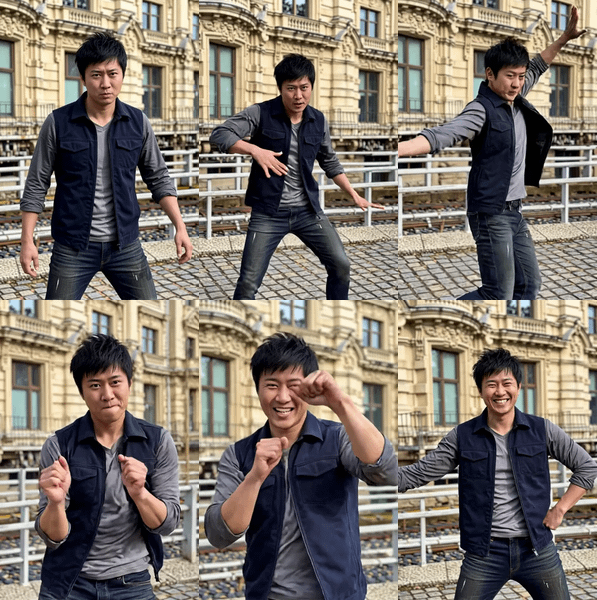
Upload a reference video of a person performing. Describe the character you want in the result. Marey carries over the pose, gesture, facial expression, and timing from your reference and generates a new 1080p clip with your described character performing the same way.
Add a reference image if you want to lock the first frame to a specific character look. Leave it empty and the prompt drives the character design from scratch.
How do you use Pose Transfer with Moonvalley Marey?
Load your reference performance video into the video input. Write a prompt describing the character and scene you want in the output. Hit Run. Marey preserves the body pose, gesture, and facial expressions from your video and applies them to the new character described in your prompt. Add a reference image to lock the first-frame look.
Reference video This is where the performance comes from. Marey picks up body pose, gestures, facial expressions, and timing from this clip. Pick a video with clear human performance: the face visible, the body in frame, the motion readable. Marey handles humans. Animals are on the roadmap but not live. Videos longer than 10 seconds get trimmed to the first 10.
Positive prompt Describe the character and scene you want in the output. The default example shows the format worth copying: start with a Detailed Description of the character (face, wardrobe, distinguishing features, and their action), then add Background, Middleground, and Foreground layers. Marey reads structured prompts well. Specify lighting, environment, and any small details you want carried through.
Reference image (optional) Use this when you want the first frame of your output locked to a specific character look. Leave it empty and the prompt does all the work. Set it when you're generating a sequence and need the opening frame to match a keyframe from another shot.
First frame image (optional) Separate from the reference image. Use this when you have a specific composition you want the video to open on. Most runs don't need this.
Negative prompt Pre-loaded with Marey's defaults: stiff animation, uncanny eyes, bad rigging, low-poly look, bloom spam, scene cuts, synthetic artifacts. Start here. Add terms only if you see a specific artifact in your output you want gone.
Seed Set to randomize, so every run gives you a new take on the same performance. Got a generation you like? Note the seed and flip randomize off to lock the base. Then iterate on the prompt against that fixed seed.
What is Marey Pose Transfer good for?
Pose Transfer is built for character performance work. Take an actor's gesture and expression from one clip and put it on a completely different character. Useful for animation previz, character exploration, stunt work where the performer changes between shots, or content where the performance is locked and only the character design varies.
Good fit: animation previsualization where you record a reference performance and iterate character designs around it, VFX work where a stunt double's motion needs to transfer to the final character, advertising concepts where the same talent performance plays across different character treatments, historical or fantasy characters performed by a modern actor. Marey's commercial safety matters here: outputs clear for client work.
Less good fit: motion-heavy scenes where the body is partially off-frame or occluded, non-human performance transfer (not yet supported), or clips where you need audio because Marey outputs silent video. For broader scene-level motion rather than performance, use Motion Transfer instead.
The trade-off: Pose Transfer quality scales with the readability of the performance in your reference. Clear lighting on the face, full body in frame, and minimal cuts make the transfer work better. Handheld, dark, or cut-heavy references give Marey less to work with.
FAQ
What's the difference between Marey Pose Transfer and Motion Transfer? Pose Transfer focuses on human performance: pose, gesture, facial expression, and timing applied to a new character. Motion Transfer carries the broader motion pattern and composition from a reference video (camera moves, full-scene motion). Pose Transfer for performance-level character work. Motion Transfer for scene-level motion.
Do I need a reference image for Marey Pose Transfer? No. You can run Pose Transfer with only a reference video and a prompt, and the prompt will drive the character design from scratch. The reference image is optional and is there for when you want to lock the first frame to a specific character look, which is useful when matching a keyframe from another shot.
What kind of reference video works best for Marey Pose Transfer? Clear, well-lit human performance with the face and body readable. Avoid heavy cuts, occlusions, or shaky handheld that hides the motion. Videos up to 10 seconds. Performances with expressive face and gesture give Marey more to transfer. A flat, low-energy reference produces a flat output.
Can Marey Pose Transfer do non-human characters? Humans and animated humans work now. Animal performance transfer is on Moonvalley's roadmap but not live yet. If you want a stylized humanoid (a tribal chief, a sci-fi figure, a cartoon person), the reference should still be a human performance. The character treatment comes from the prompt.
How to run Moonvalley Marey Pose Transfer online? You can run Marey Pose Transfer online through Floyo. No installation, no setup. Open the workflow in your browser, upload your inputs, and hit run.
Read more



%20(2)_1774290976171.webp?width=400&height=300&quality=80&resize=contain&format=origin)


