

Image-to-image one-click nine views
Image-to-image one-click nine views [same character, same scene, same outfit] super consistent model set enhanced version (no watermark version)
Image
multipose
pose
0
819
caos
Nodes & Models
GetNode
CLIPLoader
qwen_2.5_vl_7b.safetensors
VAELoader
qwen_image_vae.safetensors
UNETLoader
qwen_image_edit_2509_bf16.safetensors
SaveImage
LoadImage
ImageFromBatch
LoraLoaderModelOnly
Qwen-Image-Edit-2509-Lightning-4steps-V1.0-bf16.safetensors
Qwen-Image-Edit-F2P.safetensors
TextEncodeQwenImageEdit
SetNode
ModelSamplingAuraFlow
ImageConcanate
KSampler
VAEDecode
PreviewImage
CR Prompt Text
AILab_QwenVL
LayerUtility: ImageReel
LayerUtility: ImageReelComposit
JDCN_StringToList
ShowText|pysssss
ShowText|pysssss
TextEncodeQwenImageEditPlusAdvance_lrzjason
CompressImages
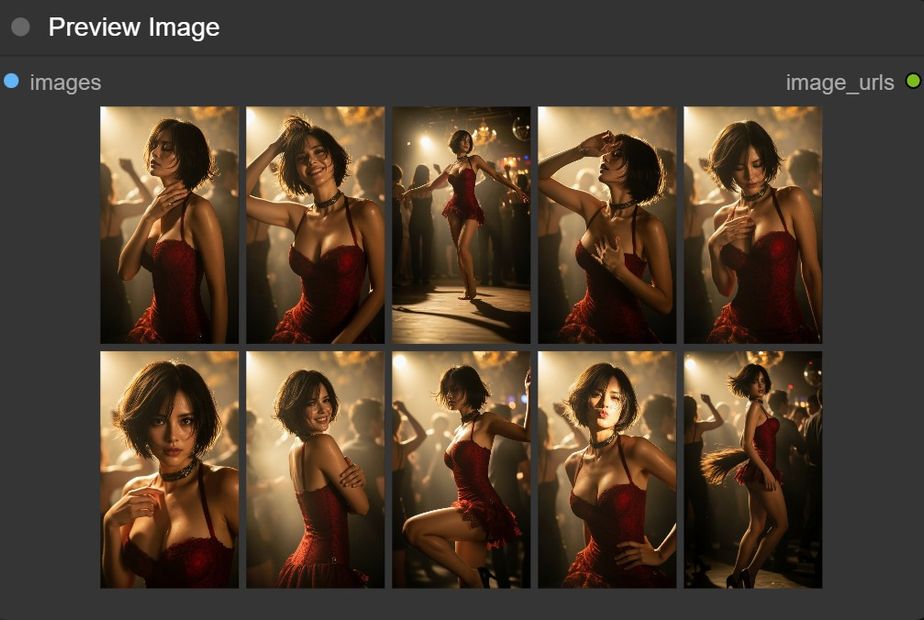
Image-to-Image One-Click Nine Views is a ComfyUI workflow designed to create highly consistent 9-image sets from a single reference photo. It preserves the same person (face/body), the same outfit, and the same background + lighting, and produces natural variations only in facial expression, body pose/action, shot size, and camera angle, with a photorealistic, professional photography look.
What it does
Analyzes the input image and automatically generates 9 structured prompts (one per view) using Qwen-VL.
Runs image editing / i2i generation with Qwen Image Edit, using the reference for maximum consistency.
Builds a 3x3 grid / reel from the 9 outputs.
Saves all images and can export a ZIP for easy download/share.
Best for
Character consistency (datasets, LoRA prep, model sheets, UGC/profile packs).
Quickly exploring poses + expressions without changing styling or scene.
Fast batch content for social media or visual reference.
Inputs / Outputs
Input: 1 reference image (your base character).
Output: 9 edited/generated images (batch) + grid/reel + optional ZIP.
Notes
For best results: use a clean, well-lit reference with the outfit clearly visible.
If you want less drift, strengthen the negative prompt and restrict prompts from changing lighting/background/props.
Requirements: ComfyUI + common custom nodes (prompt utilities, string-to-list, batch/grid tools) and the corresponding Qwen models (VL + Image Edit + VAE/LoRA if used).
Read more





_1786518453053.png?width=400&height=300&quality=80&resize=cover)


