

ERNIE Image · Text to Image For Kids Edu
Generate images from a text prompt using ERNIE-Image, Baidu's 8B DiT model with a built-in prompt enhancer and precise text rendering. Type a prompt and hit run.
ernie image
Image
text rendering
text to image
129


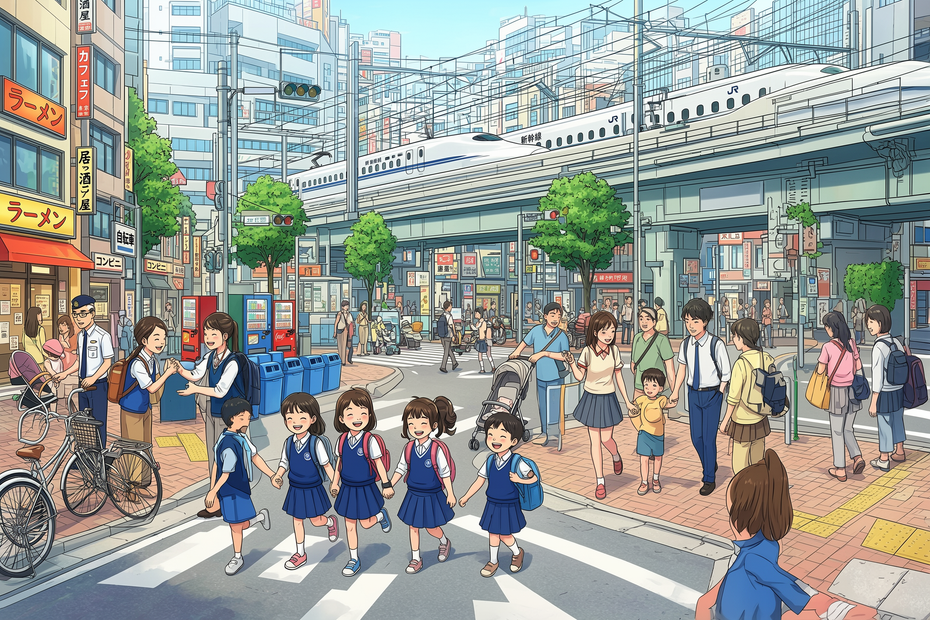



Nodes & Models
PrimitiveStringMultiline
EmptyFlux2LatentImage
UNETLoader
ernie-image.safetensors
PrimitiveBoolean
CLIPLoader
ministral-3-3b.safetensors
ernie-image-prompt-enhancer.safetensors
VAELoader
flux2-vae.safetensors
PreviewImage
CLIPTextEncode
VAEDecode
KSampler
StringReplace
TextGenerate
ComfySwitchNode
PreviewAny
FloyoStickyNote
ABOUT THE WORKFLOW
Generate an Image
Type what you want to see and get a high-quality image. Short prompts work well because a built-in 3B Prompt Enhancer automatically rewrites them into richer descriptions before generation. The model is strong at rendering legible text inside images in English, Chinese, and Japanese, and at producing structured layouts like posters, comics, and multi-panel compositions. That's it.
Model
ERNIE-Image by Baidu. An 8B parameter Diffusion Transformer (Apache 2.0) designed for accurate text rendering, complex instruction following, and structured visual content. Ships with a built-in 3B Prompt Enhancer that expands short inputs into detailed descriptions automatically.
HOW IT WORKS
Step 1. Write a prompt
Describe the image you want. Short prompts work fine because the built-in enhancer expands them. "A girl by the sea" becomes a full description with lighting, composition, and mood before the model generates. For text inside the image, include the exact words in your prompt.
Works great with: posters · illustrations · product shots · scenes with text
Step 2. Hit run and download
ERNIE-Image enhances your prompt, generates the image, and returns the result. Preview it in the workflow, then download.
Ready for: Photoshop · Figma · Canva · any editor
First time? Leave every setting as-is. The defaults (1920×1280 · 20 steps · 4 guidance · prompt enhancement on) are the right starting point for almost everyone.
RECOMMENDED SETTINGS
Quick-start guide. Find the goal that matches yours and copy the settings.
Standard generation (most people) — 1920×1280 · 20 steps · 4 guidance · prompt enhancement on · random seed. The right starting point for almost everyone.
Want higher quality and more detail — Raise steps to 30 or 50. The model creators recommend 50 steps for best quality. The gains are visible, especially in complex scenes, but generation takes longer.
Want full control over the prompt — Turn prompt enhancement off. The model will use your prompt exactly as written, with no rewriting. Useful when you have already written a detailed description and do not want it changed.
Want a poster or layout with text — Include the exact text in your prompt, in quotes. "A movie poster with the title 'Midnight Express' in bold serif letters" is clearer than "a movie poster." The model handles dense, multi-line text and structured layouts better than most open-source alternatives.
Want a different image size — Change width and height. Supported aspect ratios include 1:1 (1024×1024), 3:2 (1920×1280), 2:3 (1280×1920), and others. The default is landscape at 1920×1280.
Want to compare variations — Leave the seed on random. Each run produces a different interpretation of the same prompt.
The result does not match the prompt — Try turning prompt enhancement off. The enhancer can sometimes steer the result away from your intent, especially with very specific prompts.
Prompt: Short prompts work. The built-in enhancer adds detail automatically. If you want precision, turn enhancement off and write a full description yourself. For text in the image, quote the exact words. The model supports English, Chinese, and Japanese prompts natively.
LEARN
📹 Videos
ComfyUI 101 Free Course ft. Sebastian Kamph
Floyo 101 for Team Collaboration
✨ Quick links
USE CASES
🔤 Text-Heavy Visual Content
Generate posters, infographics, signs, and UI mockups with legible text baked into the image. ERNIE-Image scored 0.9733 on LongTextBench, the highest among open-weight models for in-image text rendering.
📰 Poster and Layout Design
Create structured multi-panel layouts, comic pages, storyboards, and formatted compositions from a single prompt. The model handles grid-based arrangements and spatial relationships between elements.
🎨 Illustration and Scene Generation
Describe a detailed scene and get a richly composed result. The prompt enhancer fills in lighting, mood, and composition details even from short inputs, making it easy to iterate quickly.
🛍️ Marketing and Campaign Imagery
Generate campaign visuals, social media content, and product shots with embedded text in English, Chinese, or Japanese. Useful for bilingual markets and rapid asset production.
WHAT WORKS BEST / WHAT TO AVOID
✅ Works great
Text-heavy content: posters, signs, infographics, UI mockups
Structured layouts: comics, storyboards, multi-panel compositions
Short prompts (the enhancer fills in the detail)
Bilingual and trilingual text rendering
⚠️ May produce softer results
Prompts where the enhancer overrides your specific intent (turn it off for precision)
Extremely high resolution outputs above default
Niche subjects with limited training representation
Photo-identical likenesses of real people or branded products
FAQ
What is ERNIE-Image?
ERNIE-Image is an 8B parameter open-source text-to-image model developed by the ERNIE team at Baidu, released under the Apache 2.0 license. It uses a single-stream Diffusion Transformer architecture paired with a 3B Prompt Enhancer. It is designed for accurate text rendering, structured layouts, and complex multi-object compositions.
What is the Prompt Enhancer and should I leave it on?
The Prompt Enhancer is a separate 3B parameter language model that rewrites short prompts into richer, more detailed descriptions before the image is generated. Leave it on for casual use. It turns "a girl by the sea" into a full scene description with lighting, composition, and mood. Turn it off when you have already written a specific prompt and want the model to follow it exactly.
How does ERNIE-Image handle text rendering?
ERNIE-Image scored 0.9733 on LongTextBench, the benchmark for evaluating text rendering in generated images. It handles dense, multi-line text, bilingual signage, comic dialogue bubbles, poster headlines, and infographic labels in English, Chinese, and Japanese. Include the exact text in your prompt, in quotes, for the best results.
How is ERNIE-Image different from ERNIE-Image-Turbo?
ERNIE-Image (this workflow) is the quality-focused variant, designed for 20 to 50 steps at 4 guidance. ERNIE-Image-Turbo is a distilled version that generates in 8 steps at 1 guidance, roughly 6x faster. The quality gap between them is small on most benchmarks, but the standard version produces more detailed results on complex scenes.
Is ERNIE-Image free to use commercially?
Yes. ERNIE-Image is released under the Apache 2.0 license, which allows commercial use, modification, and redistribution. You can use the outputs in client work, published content, and commercial products.
What languages does ERNIE-Image support?
ERNIE-Image supports English, Chinese, and Japanese prompts natively. It can render text in all three languages inside generated images. It ranked among the top open-weight models for both English and Chinese text-to-image alignment benchmarks.
How to run ERNIE Image online?
You can run ERNIE Image online through Floyo. No installation, no setup, no API key to wire up. Open the workflow in your browser, type your prompt, and hit run. Free to try.
WHY FLOYO?
Floyo is the only platform with team collaboration for ComfyUI in the browser. You run workflows with no install. You share run history, assets, and models across your team. You pay only when you generate. Floyo supports open-source and closed-source models.
A designer generates an image and likes the result. A teammate opens that exact run from shared history and keeps going. No file handoffs. No version confusion.
For studios and enterprise teams, Floyo adds private workspaces, pooled resources, and a team usage dashboard. Other ComfyUI cloud tools run for one person at a time. Floyo runs for the whole team, with transparent per-generation costs.
Ready to try it?
Type a prompt and run it. The settings are already set.
Questions? Watch the free course or check the FAQ above.
Read more








