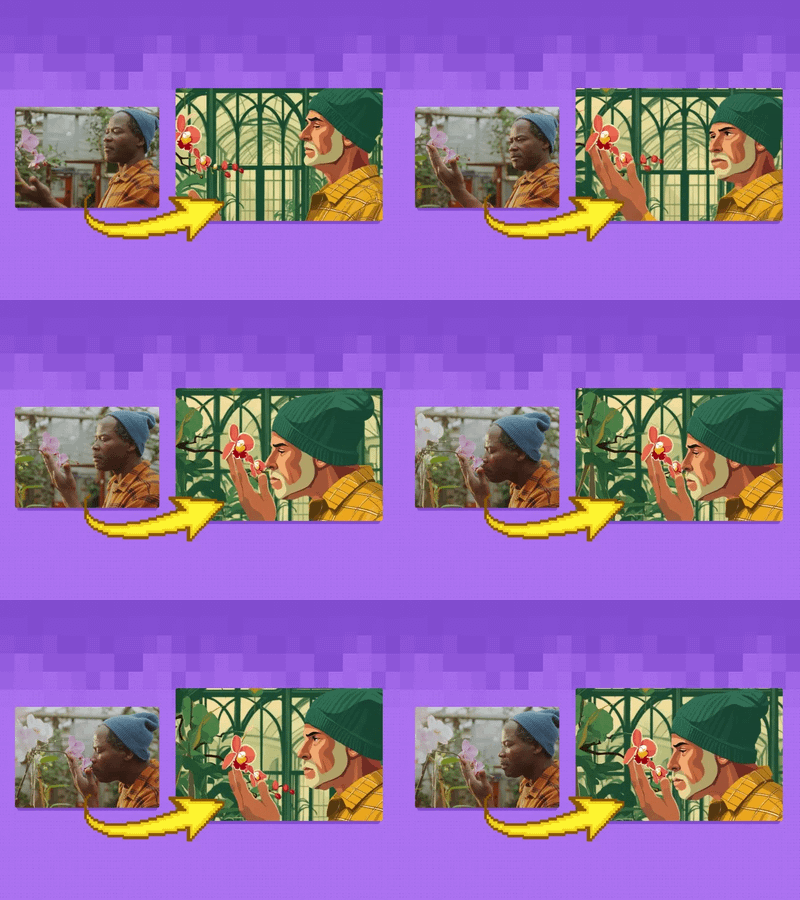
Wan 2.1 Fun Control + Flux V2V Restyle

Upload a video and describe a new visual style. FLUX.1 Dev generates a style reference frame, and Wan 2.1 Fun Control restyles the full video while preserving the original motion, structure, and audio.
depth control
flux
restyle
style transfer
Video
video to video
wan2.1 fun control
215


Nodes & Models
GetNode
WanVideoTeaCache
WanVideoSLG
UNETLoader
flux1-dev-fp8.safetensors
DualCLIPLoader
clip_l.safetensors
t5xxl_fp8_e4m3fn.safetensors
VAELoader
Note
PrimitiveInt
Label (rgthree)
WanVideoModelLoader
Wan2.1-Fun-Control-14B_fp8_e4m3fn.safetensors
WanVideoVAELoader
wan_2.1_vae.safetensors
LoadWanVideoT5TextEncoder
umt5_xxl_fp16.safetensors
easy positive
Fast Groups Bypasser (rgthree)
LoadWanVideoClipTextEncoder
open-clip-xlm-roberta-large-vit-huge-14_fp16.safetensors
LoadImage
OrchestratorNodeGroupBypasser
AddLabel
MiDaS-DepthMapPreprocessor
Scribble_XDoG_Preprocessor
DWPreprocessor
ImageResizeKJ
easy float
CLIPTextEncodeFlux
SetNode
WanVideoTextEncode
ImpactMakeImageBatch
AIO_Preprocessor
PreviewImage
ImageBlend
WanVideoEncode
EmptyLatentImage
WanVideoControlEmbeds
WanVideoClipVisionEncode
VAEDecode
WanVideoImageToVideoEncode
SaveImage
WanVideoSampler
WanVideoDecode
ImageConcatMulti
RIFE VFI
rife47.pth
LoadFluxControlNet
flux-depth-controlnet-v3.safetensors
FloyoStickyNote
CM_NearestSDXLResolution
ImageResize+
ApplyFluxControlNet
Any Switch (rgthree)
XlabsSampler
FinalFrameSelector
LoadFluxControlNet
flux-depth-controlnet-v3.safetensors
ApplyFluxControlNet
XlabsSampler
VHS_LoadVideo
VHS_SelectImages
VHS_VideoInfo
VHS_VideoCombine
CM_NearestSDXLResolution
ImageResize+
ImageResize+
ImageResize+
FinalFrameSelector
FinalFrameSelector
ABOUT THE WORKFLOW
Restyle a Video with Structural Control
Upload a reference video and describe the target style. The workflow extracts structural maps (depth, scribble, or pose) from every frame of your video, generates a style reference image from your text description using FLUX.1 Dev with a depth ControlNet, then feeds both into Wan 2.1 Fun Control to restyle the full video. The original motion, body language, and timing carry over. The new style applies to every frame. Audio from the original video is preserved. A RIFE frame interpolation pass smooths the final output. The result includes a side-by-side comparison of the original and restyled video.
Model
Wan 2.1 Fun Control 14B by Alibaba. A video model with structural control inputs (depth, scribble, pose) that restyles video frame by frame while preserving the original motion and spatial layout.
FLUX.1 Dev by Black Forest Labs. Used to generate a style reference image from a text prompt with depth-guided ControlNet, setting the visual target for the restyle.
FLUX Depth ControlNet V3 by XLabs. Guides the FLUX style frame to match the spatial layout of the first video frame.
RIFE 4.7. Frame interpolation that doubles the frame count for smoother output.
HOW IT WORKS
Step 1. Upload your reference video
The video you want to restyle. The workflow extracts up to 51 frames and preserves the audio.
Works great with: live-action footage · screen recordings · stock video · AI-generated clips
Step 2. Choose the control type
Select which structural map guides the restyle. Depth preserves spatial layout. Scribble preserves edges and outlines. Depth+OpenPose preserves both spatial layout and body pose. Enable one group and disable the others.
Step 3. Write the image prompt
Describe the visual style you want the video to look like. "Cartoon man wearing a green beanie, admiring a flower garden" generates a FLUX reference frame in that style, which the video restyle follows.
Step 4. Write the video prompt
Describe the action and style for the video. This can match or extend the image prompt. The video prompt guides Wan 2.1 Fun Control during generation.
Step 5. Paste or upload a start image (optional)
Upload your own style reference image instead of generating one with FLUX. Skip this to let the workflow generate one from the image prompt.
Step 6. Hit run and download
Wan 2.1 Fun Control restyles the video, RIFE interpolates for smoothness, and the workflow outputs the restyled video, a side-by-side comparison, and the style reference frame.
Ready for: Premiere · DaVinci Resolve · After Effects · TikTok · YouTube · Instagram
First time? Upload a video, write an image prompt describing the target style, copy the same text into the video prompt, and run with Depth control enabled. Leave everything else as-is.
RECOMMENDED SETTINGS
Quick-start guide. Find the goal that matches yours and copy the settings.
Standard video restyle — Depth control enabled, 25 steps, CFG 4, shift 7, 81 frames. Upload your video, write both prompts, run.
Preserve body pose and gesture — Enable the Depth+OpenPose group instead of Depth. The OpenPose layer tracks body, hand, and face keypoints alongside the depth map, holding the original pose more tightly.
Preserve edges and outlines more than depth — Enable the Scribble group. Scribble extracts line structure, which works better for videos with strong graphic edges or architectural content.
Stronger or weaker restyle — Adjust the control embed end_percent (default 0.75). Lower it toward 0.5 for a stronger style shift. Raise it toward 0.9 to hold the original structure more tightly.
Different resolution — Change the width and height primitives. The default internal resolution is 832x480. Higher resolution produces sharper output but takes longer.
Result looks flickery between frames — RIFE frame interpolation (2x multiplier) is on by default. If flickering persists, the source video may have very fast motion or scene cuts. Try a source clip with slower, continuous motion.
Style reference frame does not match the prompt — Adjust the FLUX seed or rewrite the image prompt. Lock the FLUX seed once you get a good reference frame and iterate on the video prompt separately.
Prompt: Write two prompts. The image prompt describes the visual style target ("watercolor village scene, cobblestone street, warm palette"). The video prompt describes the action and motion ("a woman walks through the village, camera follows from behind"). Match the style language across both for consistency. "Cartoon man in a beanie" is specific. "Make it look different" is not.
LEARN
📹 Videos
ComfyUI 101 Free Course ft. Sebastian Kamph
Floyo 101 for Team Collaboration
✨ Quick links
USE CASES
🎨 Full Video Style Transfer
Restyle live-action footage into cartoon, anime, watercolor, oil painting, or any target aesthetic while keeping the original motion and timing.
🎬 Previsualization and Look Development
Test visual styles on existing footage before committing to full production. Generate multiple restyles from the same reference video with different prompts and compare.
📱 Social Content Repurposing
Transform stock footage or screen recordings into stylized content for TikTok, Reels, and Shorts without reshooting.
🎮 Game and Animation Reference
Convert live-action reference clips into the target art style (cel-shaded, pixel art, 3D render) for use as animation reference or storyboard previews.
📐 Multi-Control Comparison
Run the same video through depth, scribble, and depth+pose controls to compare which structural guide produces the closest match to the original motion for a given style.
WHAT WORKS BEST / WHAT TO AVOID
✅ Works great
Videos with clear motion, visible subjects, and consistent lighting
Moderate motion (walking, turning, gesturing) where structure is readable
Style prompts that describe a specific aesthetic with visual detail
Matching image and video prompt language for consistent restyling
⚠️ May produce softer results
Videos with rapid scene cuts or extreme camera shake
Very dark or low-contrast footage where depth maps are unreliable
Style prompts that contradict the structural content ("underwater scene" on a walking video)
Very long source videos beyond the frame load cap (51 frames default)
FAQ
What is Wan 2.1 Fun Control?
Wan 2.1 Fun Control is a variant of Alibaba's Wan 2.1 14B video model that accepts structural control inputs like depth maps, scribble edge maps, and OpenPose keypoints. These controls let the model restyle a video while preserving the original spatial layout, motion, and body pose frame by frame.
How does the FLUX style reference work in this workflow?
FLUX.1 Dev generates a single image from your text prompt, guided by a depth ControlNet matched to the first frame of your video. This image becomes the visual style target. Wan 2.1 Fun Control reads this reference and applies its aesthetic across every frame of the video. You can also upload your own style reference image instead of generating one.
What is the difference between depth, scribble, and depth+pose control?
Depth (MiDaS) preserves spatial layout and relative distance between elements. Scribble (XDoG) preserves edges and line structure. Depth+OpenPose blends depth with body, hand, and face keypoint detection for tighter pose preservation. Depth works best for most scenes. Depth+OpenPose works best when human body pose is critical.
Does the restyle preserve the original audio?
Yes. The workflow extracts audio from the source video and embeds it in the restyled output. The audio track passes through unchanged.
Can I use my own style reference image instead of generating one with FLUX?
Yes. Upload your image into the "Load Image: Start image" input and skip the FLUX text-to-image step. The Wan model reads the uploaded image as the visual style target.
Is Wan 2.1 Fun Control licensed for commercial use?
Wan 2.1 Fun Control is an open-source model by Alibaba. FLUX.1 Dev is released under the FLUX.1 Dev Non-Commercial License by Black Forest Labs. Check both licenses for commercial use in your specific project.
How to run video-to-video restyle with Wan 2.1 Fun Control online?
You can run video-to-video restyle with Wan 2.1 Fun Control online through Floyo. No installation, no setup, no local GPU needed. Open the workflow in your browser, upload your video, and hit run. Free to try.
WHY FLOYO?
Floyo is the only platform with team collaboration for ComfyUI in the browser. You run workflows with no install. You share run history, assets, and models across your team. You pay only when you generate. Floyo supports open-source and closed-source models.
A designer runs an edit and likes the result. A teammate opens that exact run from shared history and keeps going. No file handoffs. No version confusion.
For studios and enterprise teams, Floyo adds private workspaces, pooled resources, and a team usage dashboard. Other ComfyUI cloud tools run for one person at a time. Floyo runs for the whole team, with transparent per-generation costs.
Ready to try it?
Upload a video, describe the target style, choose a control type, and hit run.
Questions? Watch the free course or check the FAQ above.
Read more