SHARP · Image to 3D Gaussian Splat
Upload one image and Apple's SHARP model generates a 3D Gaussian Splat in under a second, with a live 3D preview and a downloadable PLY file.
3D
3d reconstruction
gaussian splat
image to 3d
ply
sharp
523
_1783319220986.gif)
_1783319220987.gif)


Nodes & Models
LoadImage
LoadSharpModel
SharpPredict
PreviewAny
GeomPackPreviewGaussian
FloyoStickyNote
ABOUT THE WORKFLOW
Turn a Photo into a 3D Splat
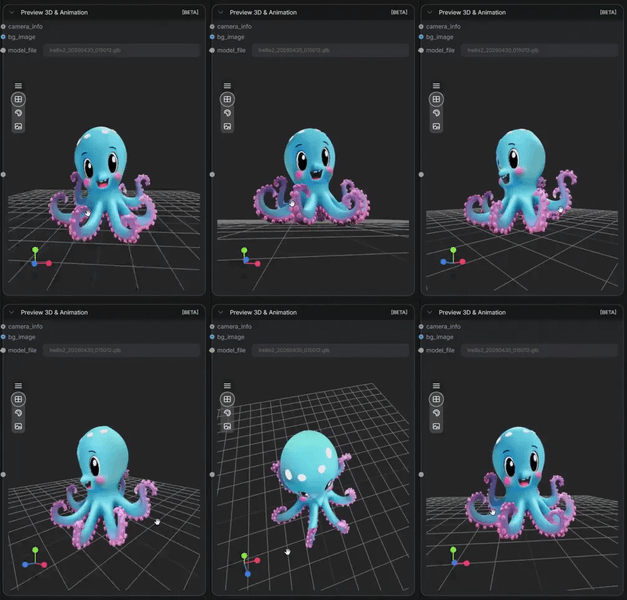
Upload a single image. SHARP estimates depth, geometry, and appearance from that image and outputs a 3D Gaussian Splat as a PLY file in under one second. The workflow includes a live 3D preview so you can orbit the result in your browser before downloading. No prompt, no settings to configure, no multi-view capture needed.
Model
SHARP by Apple Research. A resolution-preserving transformer that generates monocular 3D Gaussian Splats from a single image in sub-second inference. Released under the MIT license.
HOW IT WORKS
Step 1. Upload your image
Any single photo, render, or AI-generated image. One clear view of the subject is all the model needs.
Works great with: product photos · architecture · character renders · landscapes · interiors
Step 2. Hit run
SHARP estimates depth and geometry, generates the Gaussian Splat, and saves a PLY file. A 3D preview loads in the workflow so you can orbit and inspect the result.
Step 3. Download the PLY file
The output is a standard PLY file containing the 3D Gaussian Splat. Import it into any compatible viewer or engine.
Ready for: SuperSplat · Unity · Unreal · Blender · GaussianSplats3D · any 3DGS renderer
First time? Upload an image and hit run. No settings to change. The defaults handle everything.
RECOMMENDED SETTINGS
Quick-start guide. Find the goal that matches yours and copy the settings.
Standard 3D splat from a photo — Precision auto, focal length 30mm, PLY output. Upload your image and run. No changes needed.
Your image was shot with a known lens — Set the focal_length_mm to the actual focal length from your camera. EXIF data from a phone or DSLR gives you this number. Matching the real focal length improves depth accuracy.
Object looks stretched or flattened in the 3D preview — The focal length estimate is off. Try raising or lowering the focal_length_mm value. A wider lens (lower number) deepens the perspective. A longer lens (higher number) flattens it.
Need higher precision at the cost of speed — Change precision from auto to fp32. Slower inference, but finer geometric detail in the output splat.
Output looks noisy or sparse — Start with a cleaner, better-lit source image. SHARP reads depth from a single view, so strong lighting, clear edges, and visible surface detail produce denser, more accurate splats.
Prompt: No prompt is needed. The workflow is fully automatic. Upload an image and run.
LEARN
📹 Videos
ComfyUI 101 Free Course ft. Sebastian Kamph
Floyo 101 for Team Collaboration
✨ Quick links
USE CASES
🛍️ Product 3D Assets from Photos
Turn an existing product photo into an explorable 3D asset for e-commerce, AR previews, or 3D catalogs without a 3D scanner or multi-view capture rig.
🏗️ Architectural and Interior Visualization
Generate a 3D splat from a single interior or exterior photo for spatial reference, client walkthroughs, or set extension planning.
🎨 Concept Art to 3D Reference
Convert a concept art frame or AI-generated image into a rough 3D scene for spatial reference, camera planning, or lighting tests before committing to a full CG build.
🎮 Game and VFX Asset Previsualization
Generate quick 3D splats from reference photos to block out environments, props, or characters before modeling.
WHAT WORKS BEST / WHAT TO AVOID
✅ Works great
Well-lit photos with clear depth cues and visible surfaces
Single-object product shots on clean backgrounds
Architectural exteriors and interiors with strong perspective lines
Landscape and environment photos with foreground and background separation
⚠️ May produce softer results
Flat, texture-less surfaces (white walls, blank sky)
Extreme close-ups with no depth variation
Very dark or underexposed images where geometry is hard to read
Images with heavy motion blur or extreme lens distortion
FAQ
What is SHARP by Apple?
SHARP stands for SHarp MonoculAr View Synthesis in Less than a Second with a Resolution-Preserving Transformer. It is an open-source model by Apple Research that generates a 3D Gaussian Splat from a single input image in under one second. It estimates depth, geometry, and view-dependent appearance from one photo without requiring multiple views or camera calibration.
What is a 3D Gaussian Splat and what can I do with it?
A 3D Gaussian Splat is a point-cloud-based 3D representation where each point stores position, color, opacity, and shape. When rendered, these points produce photorealistic views from novel angles. The output PLY file loads into SuperSplat, Unity, Unreal, Blender, and any standard 3DGS renderer for viewing, integration, or further editing.
Does SHARP need multiple photos or a video scan?
No. SHARP works from a single image. One clear photo is the only input. The model infers depth and 3D structure from monocular cues in that single view. No multi-view capture, no photogrammetry rig, no video scan required.
What does the focal length setting do?
Focal length tells the model the field of view of the camera that captured the image. The default of 30mm works for most photos. If you know the actual lens focal length from EXIF data, setting it accurately improves depth estimation. A wrong focal length can make the output look stretched or flattened.
Is SHARP fast enough for batch processing?
Yes. Inference runs in under one second on a modern GPU. This makes it practical for batch-converting product photos, reference images, or concept art into 3D splats at scale.
Is SHARP licensed for commercial use?
Yes. SHARP is released by Apple Research under the MIT license. The model weights and code are fully open source. Outputs are yours to use in commercial projects including games, VFX, e-commerce, and client work.
How to run SHARP 3D Gaussian Splat generation online?
You can run SHARP 3D Gaussian Splat generation online through Floyo. No installation, no setup, no local GPU needed. Open the workflow in your browser, upload your image, and hit run. Free to try.
WHY FLOYO?
Floyo is the only platform with team collaboration for ComfyUI in the browser. You run workflows with no install. You share run history, assets, and models across your team. You pay only when you generate. Floyo supports open-source and closed-source models.
A designer runs an edit and likes the result. A teammate opens that exact run from shared history and keeps going. No file handoffs. No version confusion.
For studios and enterprise teams, Floyo adds private workspaces, pooled resources, and a team usage dashboard. Other ComfyUI cloud tools run for one person at a time. Floyo runs for the whole team, with transparent per-generation costs.
Ready to try it?
Upload a photo and hit run. The 3D splat generates in under a second.
Questions? Watch the free course or check the FAQ above.
Read more
_1783321634939.png?width=400&height=300&quality=80&resize=cover)