Qwen Image 2512 and NVIDIA PiD Text to 4k Image
Generate with Qwen Image 2512 and let NVIDIA PiD decode straight to 4K. One prompt, one run, a 4096px image with no separate upscale pass needed.
4k
concept art
Image
portrait
qwen
text to image
upscaling
253


Nodes & Models
Note
UNETLoader
qwen_image_2512_bf16.safetensors
CLIPLoader
qwen_2.5_vl_7b_fp8_scaled.safetensors
PiDTextPrompt
PiDEmptyLatentImage
ModelSamplingAuraFlow
CLIPTextEncode
PiDKSamplerCapture
PiDPrepare
PiDSample
PiDFinalize
SaveImage
Text to image with Qwen Image 2512, finished in 4K by NVIDIA PiD.
Write a prompt and hit Run. Qwen Image 2512 generates the image, then PiD replaces the usual decode-then-upscale chain with a single diffusion pass that outputs a 4096px file. No second workflow, no upscale model to choose, no tiling artifacts to fix.
The defaults are already paired to the builder's recommended settings. Change the prompt, run it, get 4K back.
How do you generate 4K images with Qwen Image 2512 and NVIDIA PiD?
Write your prompt and hit Run. Qwen Image 2512 generates at 1024px over 50 steps, then PiD takes the result at step 44 and decodes it directly to 4096px. Everything else is pre-tuned to the recommended pairing for this model, so for a first run the prompt is the only thing you need to touch.
Prompt
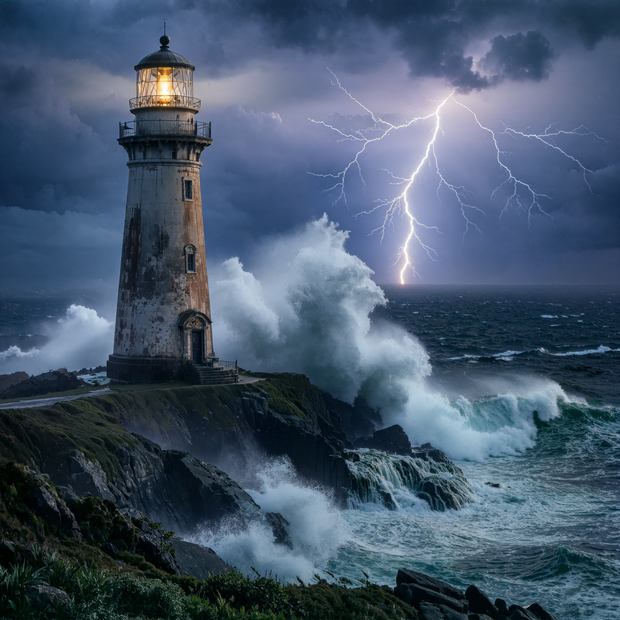
Describe the full scene: subject, environment, lighting, style. The loaded example shows the pattern: "A weathered lighthouse on a stormy cliff at twilight, massive waves crashing against the rocks, dramatic chiaroscuro lighting, hyperrealistic." Your prompt does double duty here. It guides the base generation and also feeds PiD during the 4K decode, so detail words like "fine texture" or "sharp foliage" pay off twice.
Negative prompt
Empty by default. Add things you keep getting and don't want: "blurry, watermark, extra fingers." Leave it empty if your results look clean.
Resolution
Default is 1024x1024. Keep the base at 1024 if you want 4K output. PiD multiplies by 4, so 1024 becomes 4096. Drop the base lower and your final output drops with it.
Steps and capture step
50 steps with capture at 44 is the recommended pairing for this model. PiD grabs the image a few steps before the sampler finishes and does the final refinement itself at full resolution. If you raise or lower steps, keep capture about 5 to 6 steps below the total. Setting capture too close to the step count gives PiD nothing left to refine.
CFG
Default is 4. Want the model to take more creative liberty with your prompt? Try 2.5 to 3. Need it to follow every word? Push toward 5. Past that, colors start to burn.
Seed
Set to randomize. Found a composition you like and want to test prompt tweaks against it? Lock the seed and only the wording changes between runs.
Batch size
Default is 1. Bump it to 3 or 4 when you want options to pick from. The catch: each image in the batch gets the full 4K decode, so the run takes proportionally longer.
The PiD sampler settings (4 steps, cfg 1) match the checkpoint's native configuration. Leave them alone.
What is Qwen Image 2512 with PiD good for?
Use this when the final image needs to hold up at 4K: key art, print, wallpapers, client deliverables, anything someone will zoom into. PiD finishes the image in a single 4-step pass, so you get 4096px output in close to the time of a normal generation instead of a long tiled upscale.
The strength of this pipeline shows up in fine detail. Fur, foliage, fabric, building facades, and small background elements come out crisp instead of smeared, because PiD refines at the pixel level rather than stretching a decoded image.
The fixed point to know: NVIDIA only ships the 2kto4k PiD checkpoint for the Qwen Image backbone, so 4x from a 1024 base is the path here. There is no 2x option in this workflow. If your images only ever live on the web at 1K, a plain Qwen Image workflow gets you there faster. GitHub
FAQ
What is NVIDIA PiD and how is it different from a normal upscaler?
PiD is an open source decoder from NVIDIA research that replaces the standard VAE decoder with a 4-step diffusion-based upscaler. Instead of decoding your image and then enlarging it with a separate model, PiD does both in one pass, adding real detail at the target resolution rather than stretching pixels. YouTube
What resolution should I set for 4K output with Qwen Image 2512?
Keep the base latent at 1024x1024. PiD's checkpoint for this model is a fixed 4x, so a 1024 base decodes to 4096px. A 512 base would land at 2048px. The builder's note in this workflow recommends 1024 for full 4K.
What capture step should I use with PiD and Qwen Image 2512?
The recommended pairing is 50 sampler steps with capture at 44. PiD intercepts the latent before the final steps and handles the remaining refinement at 4K. If you change the step count, keep capture about 5 to 6 steps below it so PiD has work left to do.
Does PiD support 2x upscaling with Qwen Image?
No. The Qwen Image backbone only has NVIDIA's 2kto4k checkpoint, which runs at 4x. To get a smaller final image, lower the base resolution or downscale the 4K output afterward.
How to run Qwen Image 2512 with NVIDIA PiD online?
You can run Qwen Image 2512 with NVIDIA PiD online through Floyo. No installation, no setup. Open the workflow in your browser, write your prompt, and hit run. Free to try.
Read more