

Nano Banana Pro Storyboard: 1 Image to 5 Shots
Image
image to image
nano banana
372

Nodes & Models
VLM_floyo
NanoBananaProUnified_floyo
LoadImage
CRT_StringSplitter
SaveImage
PreviewText
PreviewText
One image in, five cinematic shots out.
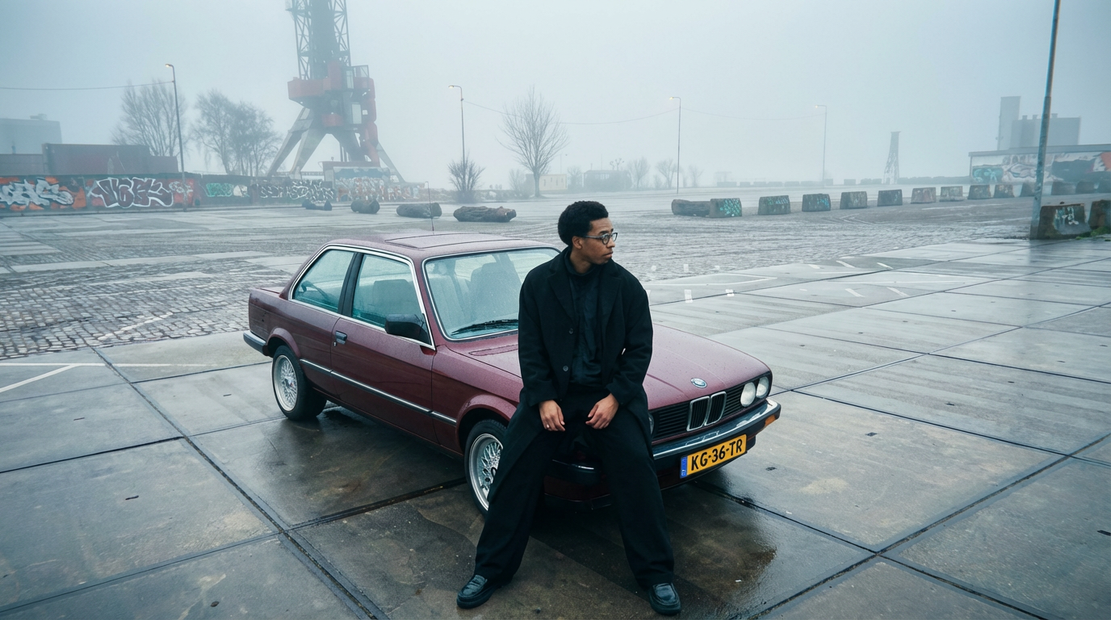
Upload a reference image. Gemini 2.5 Flash reads it and writes five cinematic prompts from what it sees. Nano Banana Pro then generates each shot using your original image as the reference, so the character, setting, and mood carry across all five outputs.
Good for pre-vis, storyboards, and turning a single frame into a sequence. The VLM system prompt is fully editable, so you can steer what kind of five shots you get: story beats, camera angles, emotional variations, anything you can describe.
How do you generate a storyboard from one image with Nano Banana Pro?
Upload your reference image and run. Gemini 2.5 Flash writes five cinematic prompts based on what's in the frame. Each prompt goes to a Nano Banana Pro instance that renders a 1K shot, passing your original image in as a reference so all five outputs stay visually connected. Five saved PNGs in about two minutes.
Input image This is the anchor. Every shot uses it as a reference, so whatever's in it (character, outfit, environment, lighting style) carries across all five outputs. Start with an image that already looks like the world you want expanded.
VLM system prompt This is where you steer the storyboard. The default asks Gemini for five cinematic prompts with quality tokens baked in. Want five camera angles of the same moment? Rewrite the system prompt to say that. Want five beats of a story? Say that. Want five emotional states? Say that. The model follows the instructions you give it.
Resolution Default is 1K. That's the sweet spot for speed. Nano Banana Pro also supports 2K if you need more detail for final frames. The catch: generation time roughly doubles.
Aspect ratio Default is auto. Nano Banana Pro picks an aspect ratio based on your reference image. Lock it to 16:9 for widescreen, 9:16 for vertical, or 1:1 for square if you need a specific format across all five shots.
Seed Randomized per shot by default. Leave it that way so the five outputs have variety. Switch to fixed if you want to regenerate the exact same five shots with a different VLM prompt.
Output format PNG by default for clean edges and transparent support. Switch to JPG if you want lighter files for a fast review cycle.
What is 1-image-to-5-shots good for?
Turning a single frame into a scene. Pre-visualization for film and video, storyboard drafts from a key art reference, concept exploration when you want to see the same character in five situations, mood boards built around one anchor image. Anywhere you need variety without losing consistency.
Good fits: shooting a director a visual pitch from one hero shot. Expanding a character design into five poses or moments. Exploring how a product might look across five scenarios. Drafting a storyboard when you have the opening frame and need the next few beats.
Where it struggles: tight shot matching where you need pixel-level continuity between frames. The five outputs share the reference, but they're independent generations, so edges and fine details will shift. For locked continuity across shots, regenerate the best shot as your new reference and iterate.
FAQ
How does Nano Banana Pro turn one image into five? Gemini 2.5 Flash looks at your image and writes five prompts describing five different shots. Each prompt is sent to a separate Nano Banana Pro call along with your original image as a visual reference. The result is five outputs that share the world of your input but show different moments, angles, or actions.
Can I control what the five shots look like? Yes. The VLM system prompt is where you steer it. The default asks for five cinematic prompts. Rewrite it to ask for five camera angles, five story beats, five emotions, five lighting setups, five time-of-day variations, whatever you need. Gemini follows your instructions.
Does each shot use my input image? Yes. Every one of the five Nano Banana Pro calls receives your original image as image1. That's why the character, outfit, and scene style stay recognizable across the outputs, instead of drifting the way they would with five unrelated text-to-image runs.
What resolution does Nano Banana Pro output? 1K PNG by default, which runs in about 20 to 40 seconds per shot. Nano Banana Pro also supports 2K if you need higher detail for final frames, at roughly double the generation time. For storyboard drafts and pre-vis, 1K is usually enough.
How to run Nano Banana Pro online? You can run Nano Banana Pro storyboard generation online through Floyo. No installation, no setup. Open the workflow in your browser, upload your reference image, and hit run.
Read more





_1786516256661.png?width=400&height=300&quality=80&resize=cover)


