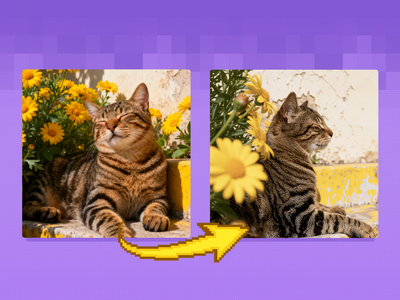
FLUX.2 Klein 9B: Realistic Photo Enhancer
Create realistic image but in an enhanced details using FLUX.2 Klein 9B and with LoRA
FLUX
FLUX.2 Klein
Image
Image2Image
LoRA
LoRAs
realism
5
9.1k






Nodes & Models
LoadImage
VAELoader
flux2-vae.safetensors
UNETLoader
flux-2-klein-9b.safetensors
CLIPLoader
qwen_3_8b_fp8mixed.safetensors
PrimitiveFloat
LoraLoaderModelOnly
realistic_enhanced_details_lora-flux-2-klein-9b-realis-TxUBt7PL.safetensors
CLIPTextEncode
SaveImage
ConditioningZeroOut
VAEDecode
EmptyFlux2LatentImage
ReferenceLatent
ImageScaleToTotalPixels
VAEEncode
KSampler
GetImageSize
ImageScale
ImageConcanate
ABOUT THE WORKFLOW
Image to Image Upload an image and the model turns it into a realistic, detailed photograph. That's it.
Open weights, so you only pay for generation time. All models pre-loaded on Floyo.
Model
FLUX.2 [klein] 9B. Black Forest Labs' fast open-weight image model.
Realistic Enhanced Details LoRA. Adds fine texture and photoreal detail to the result.
HOW IT WORKS
Step 1. Upload your image A render, illustration, sketch, or flat photo you want to make look real. Works great with: 3D renders · illustrations · concept art · flat photos
Step 2. Set your instruction (optional) The prompt tells the model what to do, like "turn this into a realistic photograph." Leave it as-is for a straight realism pass.
Step 3. Hit run and download The model rebuilds the image as a realistic photo and shows it next to the original. Preview it in the workflow, then download. Ready for: Photoshop · Figma · Canva · any editor
First time? Leave every setting as-is. The defaults (1MP · 4 steps · CFG 1 · LoRA at 0.5) are the right starting point for almost everyone.
RECOMMENDED SETTINGS
Quick-start guide. Find the goal that matches yours and copy the settings.
Standard pass (most people) ★ Start here — 1MP · 4 steps · CFG 1 · LoRA at 0.5. The right starting point for almost everyone.
Want more detail and texture — Raise the LoRA strength toward 0.7 to 0.8 for stronger realism, though too high can look over-sharpened.
Keep it closer to the original — Lower the LoRA strength toward 0.3 for a lighter realism touch.
Stronger transformation — Adjust the prompt to describe the realistic look you want, like the lighting and the materials.
The result drifts from the source — Keep the prompt short and specific about what to preserve from the original.
Want higher fidelity — Use a clean, reasonably sized input. Sharp inputs convert more accurately than soft or low-resolution ones.
Reproduce a result you liked — Lock the seed to the number that produced it.
Prompt: Say what you want the image to become, not a full scene. "Turn this into a realistic photograph" is enough, and adding lighting or material cues steers the realism further.
USE CASES
🎨 Render to Photo Turn a 3D render or CG frame into a realistic photograph.
✏️ Art to Real Convert an illustration or concept piece into a photoreal version.
📸 Photo Enhancement Add fine detail and texture to a flat or soft photo.
🛍️ Product Realism Make a product mockup or render look like a real photo.
WHAT WORKS BEST / WHAT TO AVOID
✅ Works great
3D renders and CG frames
Illustrations and concept art
Clean, reasonably sized inputs
A clear "make it realistic" instruction
⚠️ May produce softer results
Low-resolution inputs
Heavily stylized images you want to keep stylized
LoRA strength pushed too high
Vague prompts with no direction
LEARN
📹 Videos
ComfyUI 101 Free Course ft. Sebastian Kamph
Floyo 101 for Team Collaboration
✨ Quick links
FAQ
What does this workflow do? It takes an image you upload and rebuilds it as a realistic, detailed photograph. It pairs FLUX.2 Klein 9B with a Realistic Enhanced Details LoRA, so a render, illustration, or flat photo comes out looking more like a real photo, with the original and the result shown side by side.
What is FLUX.2 Klein 9B? FLUX.2 Klein 9B is a fast open-weight image model from Black Forest Labs, part of the FLUX.2 family. It is a 9-billion parameter model that unifies generation and editing, using an 8B Qwen3 text embedder. In this workflow it runs image-to-image, reworking your input toward a realistic photo.
What does the Realistic Enhanced Details LoRA do? It boosts fine texture and photoreal detail on top of the base model. The LoRA strength controls how much it pushes: the default of 0.5 is balanced, higher adds more detail and crispness, and lower keeps the result closer to the original. It is added on top of Klein 9B, so it shapes the look rather than changing what the model does.
What settings should I use? Use 1MP output, 4 steps, and CFG 1 with the euler sampler, and keep the LoRA around 0.5. Raise the LoRA strength when you want more detail, lower it when the result looks over-processed, and adjust the prompt to describe the lighting and materials you want in the final photo.
How is this different from the Klein 9B prompt-editing workflow? The prompt-editing workflow handles general instruction edits and multi-image composition. This one is tuned for a single job: converting an image into a realistic, detailed photograph using the realism LoRA. Use this when your goal is photorealism, and the editing workflow when you want to change objects, colors, or combine references.
Can I use the results commercially? Be careful here. FLUX.2 Klein 9B is released under the FLUX Non-Commercial License, and only the smaller 4B Klein models are Apache 2.0, so commercial use of the 9B model requires a separate license from Black Forest Labs at bfl.ai/licensing. You should also check the license of the Realistic Details LoRA before any commercial use.
How to run FLUX.2 Klein 9B online? You can run FLUX.2 Klein 9B online through Floyo. No installation, no setup, no GPU to rent. Open the workflow in your browser, upload an image, and hit run. Free to try.
WHY FLOYO?
Floyo is the only platform with team collaboration for ComfyUI in the browser. You run workflows with no install. You share run history, assets, and models across your team. You pay only when you generate. Floyo supports open-source and closed-source models.
A designer runs a realism pass and likes the result. A teammate opens that exact run from shared history and keeps going. No file handoffs. No version confusion.
For studios and enterprise teams, Floyo adds private workspaces, pooled resources, and a team usage dashboard. Other ComfyUI cloud tools run for one person at a time. Floyo runs for the whole team, with transparent per-generation costs.
Ready to try it? Upload an image and run it. The settings are already set.
Questions? Watch the free course or check the FAQ above.
Read more
0
Reply
1
Reply
_1786522681696.png?width=400&height=300&quality=80&resize=cover)