


COMMUNITY PAGE
Run Meshy on Floyo
Home / Model / Meshy v6 on Floyo
AI 3D MODEL GENERATION
Run Meshy v6 on Floyo
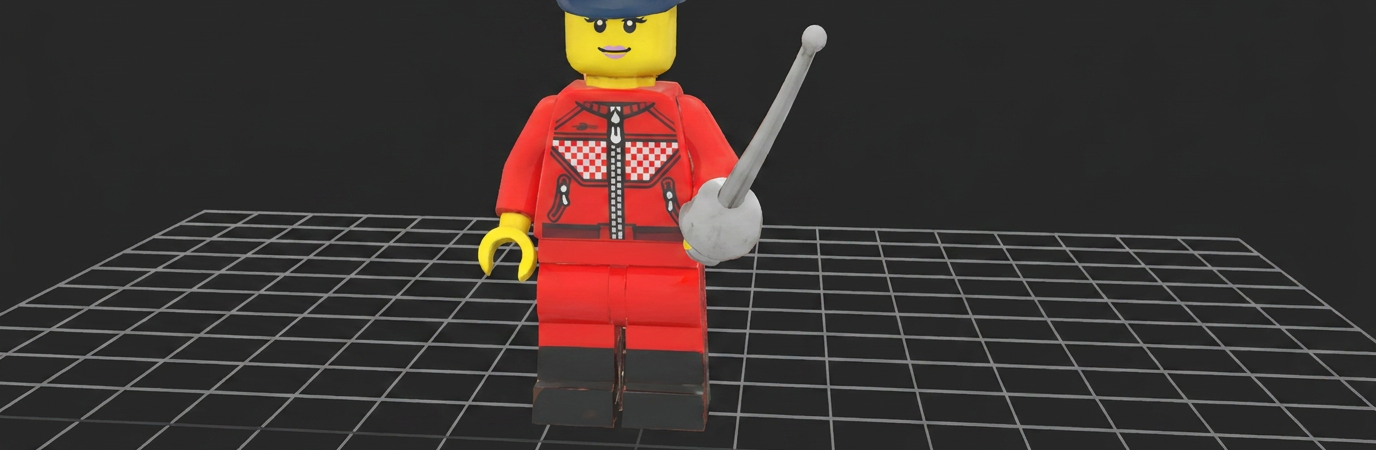
The #1 AI 3D model generator. Text-to-3D and image-to-3D with production-ready geometry, PBR textures, auto-rigging, and export to GLB/FBX/OBJ/USDZ. Up to 300K polygons with quad or triangle topology.
Run Meshy v6 through ComfyUI in your browser. No API key, no installs, no local GPU.
|
Modes Text-to-3D + Image-to-3D |
Polygons 100 to 300,000 |
|
Textures PBR (metallic, roughness, normal) |
Export GLB, FBX, OBJ, USDZ, 3MF |
No installation. Runs in browser. Updated April 2026.
What you get?
Meshy v6 is the leading AI 3D model generator. Released January 18, 2026, it generates production-ready 3D models from text prompts or 2D images in minutes. Best-in-class geometry reconstruction with smoother surfaces, better anatomical proportions, and sharper hard-surface detail than any previous version. PBR textures (metallic, roughness, normal maps) for modern rendering pipelines. Configurable polygon count from 100 to 300,000. Quad or triangle topology. Auto-symmetry detection. A/T pose for character rigging. Auto-rigging with walking and running animations. Low Poly Mode for games. Multi-color 3D printing support (3MF). Export to GLB, FBX, OBJ, USDZ. Available as ComfyUI API nodes on Floyo.
MESHY V6 WORKFLOWS ON FLOYO
What is Meshy v6?
Meshy v6 is the latest version of Meshy AI's 3D model generator, released January 18, 2026. It converts text descriptions and 2D images into production-ready 3D models with geometry, textures, and export formats suited for games, animation, 3D printing, AR/VR, and product visualization. It is the most widely used AI 3D generation platform.
The v6 upgrade focuses on geometry quality. Character models now feature smoother surfaces, more natural proportions, better facial structure, and improved limb topology that works for rigging and animation without extensive manual cleanup. Hard-surface models (mechanical parts, architecture, products) get sharper edges and clearer silhouettes. The result: less time in Blender fixing AI output, more time creating.
PBR (Physically-Based Rendering) textures ship with every generation. Metallic, roughness, and normal maps are included alongside base color. This means generated models work directly in Unreal Engine, Unity, Blender, and other modern rendering pipelines without manual texture setup. A "remove lighting" option strips baked highlights and shadows for cleaner results under custom lighting.
New in v6: Low Poly Mode generates game-ready assets with optimized polygon counts and cleaner topology. Multi-color 3D printing exports models in 3MF format with automatic color separation for FDM printers. Auto-rigging generates humanoid rigs with basic walking and running animations. Prompt expansion uses an LLM to enrich short prompts before generation.
On Floyo, Meshy v6 runs through ComfyUI API nodes. Two workflows cover text-to-3D and image-to-3D. Describe what you want or upload a reference image, configure topology, polygon count, and format, and generate. No 3D modeling software required.
What are Meshy v6's technical specifications?
Meshy v6 generates 3D models from text or images with configurable polygon counts (100 to 300,000), quad or triangle topology, PBR textures (metallic, roughness, normal maps), auto-symmetry, A/T pose output for rigging, auto-rigging with animations, and export to GLB, FBX, OBJ, USDZ, and 3MF. Low Poly Mode and multi-color 3D printing are new in v6.
| Spec | Details |
|---|---|
| Developer | Meshy AI |
| Modes | Text-to-3D, Image-to-3D, Multi-Image-to-3D, Retexture, Remesh |
| Polygon Range | 100 to 300,000 (default: 30,000) |
| Topology | Quad (smooth organic) or Triangle (detailed geometry) |
| Textures | Base color + PBR maps (metallic, roughness, normal) |
| Remove Lighting | Yes (strips baked highlights/shadows for custom lighting) |
| Symmetry | Off, Auto (default), or On |
| Pose Modes | A-pose, T-pose, or none (for rigging-ready output) |
| Auto-Rigging | Yes (humanoid rig with walking and running animations) |
| Low Poly Mode | Yes (optimized game-ready meshes with cleaner polygons) |
| 3D Printing | Multi-color 3MF export with automatic color separation for FDM |
| Auto Size | AI vision estimates real-world height and resizes automatically |
| Prompt Expansion | Built-in LLM enriches short prompts (toggleable) |
| Input Formats | Text prompts, JPG, PNG, AVIF, HEIF images |
| Export Formats | GLB, FBX, OBJ, USDZ, 3MF |
| Generation Time | Minutes per model (varies by complexity and polygon count) |
| ComfyUI Access | API-based nodes on Floyo (2 workflows) |
| Release Date | January 18, 2026 |
What can you create with Meshy v6?
Meshy v6 covers game assets, character models, product prototypes, architectural visualization, concept art in 3D, 3D printing models, AR/VR objects, animation-ready rigs, mechanical parts, organic sculpts, and low-poly game props. Both text-to-3D and image-to-3D workflows produce models with PBR textures ready for modern rendering engines.
| Capability | What It Does | Use Case |
|---|---|---|
| Text-to-3D | Describe a 3D object in text. Meshy generates the full model with geometry and PBR textures. Built-in prompt expansion enriches short descriptions. | Concept prototyping, game asset ideation, quick 3D visualization |
| Image-to-3D | Upload a 2D image (concept art, photo, sketch). Meshy reconstructs it as a textured 3D model with accurate geometry from the reference. | Concept art to 3D, product visualization, character creation |
| Auto-Rigging | Automatically rig humanoid characters with a skeleton. Includes basic walking and running animations. Works best with clearly defined limbs. | Game characters, animated content, virtual avatars |
| Low Poly Mode | Generate game-ready low-poly meshes with optimized topology. Cleaner polygons for real-time rendering without manual retopology. | Mobile games, VR, real-time 3D applications |
| 3D Printing | Multi-color 3MF export with automatic color separation for FDM printers. No manual texture-to-color mapping needed. | Physical prototypes, figurines, maker projects |
| Pipeline Integration | Chain with image models in ComfyUI. Generate a character image with Nano Banana, convert to 3D with Meshy v6, rig, and export. All in one workflow. | Concept-to-3D pipelines, multi-model asset creation |
What are Meshy v6's key features?
Meshy v6's feature set is designed around one goal: generate 3D models that need less manual cleanup before production use. Better geometry means less time in Blender. PBR textures mean direct import into game engines. Auto-rigging means skip the skeleton setup. Low Poly Mode means skip the retopology step.
Production-Ready Geometry
The biggest upgrade in v6. Character models have smoother surfaces, more anatomically correct proportions, better facial structure, and improved limb topology. Mechanical models get sharper edges and cleaner silhouettes. The geometry comes out closer to what a human modeler would produce, reducing the manual cleanup that was a bottleneck with previous versions.
PBR Texture Generation
Every model ships with physically-based rendering maps: base color, metallic, roughness, and normal. These work directly in Unreal Engine, Unity, Blender Cycles, and other PBR-compatible renderers. The "remove lighting" option strips baked highlights and shadows from the base color, giving you clean textures that respond correctly to your scene lighting.
Auto-Rigging with Animations
Enable rigging on humanoid characters and Meshy generates a skeleton with basic walking and running animations. Set the approximate character height in meters for correct proportions. This skips the manual rigging step that usually requires Blender or Maya expertise. Works best with characters that have clearly defined limbs.
Low Poly Mode
New in v6. Generates game-ready meshes with optimized polygon counts and cleaner topology. The models work for real-time rendering in mobile games, VR, and web 3D without the retopology pass that high-poly output normally requires.
Multi-Color 3D Printing
New in v6. Simplifies complex textures into clean color blocks optimized for FDM printers. Exports in slicer-friendly 3MF format with proper color separation. This removes the manual texture-to-color mapping step that previously required specialized 3D printing knowledge.
Configurable Topology and Polygon Count
Choose quad topology for smooth organic surfaces or triangle topology for detailed hard-surface geometry. Set polygon count from 100 (extremely low-poly) to 300,000 (high detail). Auto-symmetry detects and enforces bilateral symmetry. Remeshing can be toggled on or off for control over mesh optimization.
How does Meshy v6 work?
Meshy v6 uses AI to reconstruct 3D geometry from text descriptions or 2D images. For text-to-3D, a built-in prompt expansion LLM enriches your description, then the model generates geometry and textures. For image-to-3D, the model analyzes the input image, infers 3D structure, and reconstructs a textured mesh with front, side, and back geometry from a single view.
The generation pipeline has two stages. Preview generates an untextured mesh (faster, lower cost). Full generation adds PBR textures (metallic, roughness, normal maps) to the mesh. You can run preview first to check geometry, then proceed to full generation only when the shape is right.
Image enhancement is applied by default. The model preprocesses your input image to optimize it for 3D reconstruction. Turn this off with the "image enhancement" toggle when you want the exact appearance of your input preserved without any preprocessing.
On Floyo, Meshy v6 runs through ComfyUI API nodes. The text-to-3D workflow takes your prompt and configuration, sends it to Meshy's servers, and returns the 3D model file. The image-to-3D workflow takes your uploaded image. Both output downloadable 3D files in your chosen format (GLB, FBX, OBJ, USDZ). You can chain Meshy with image generation models: generate a character with Nano Banana or ERNIE Image, then convert to 3D with Meshy v6 in the same workflow.
Note: Meshy v6 is API-based, not open source. Generation runs on Meshy's servers. API pricing applies through your Floyo API Wallet. Generation time varies: preview meshes are faster, full textured models take longer depending on polygon count and complexity. Auto-rigging works best with humanoid characters and may produce unexpected results on non-humanoid shapes.
Frequently Asked Questions
Common questions about running Meshy v6 on Floyo.
You can start with Floyo's free pricing plan. Floyo gives $0.25 in free API credits on signup. To continue using the service beyond the free tier, upgrade your Floyo pricing plan. Meshy v6 runs as an API node, so generation costs come from your API Wallet (separate from your plan's GPU time).
Open Floyo in your browser, search "Meshy" in the template library, and pick the text-to-3D or image-to-3D workflow. Click Run, write your prompt or upload an image, set polygon count and format, and generate. Floyo handles the ComfyUI environment and API connection. No 3D software, no local install.
Meshy AI. Meshy v6 was released on January 18, 2026. It is the latest in a series that started with Meshy-4 (now retired) and Meshy-5. Meshy is the most widely used AI 3D model generator, used by game developers, 3D artists, product designers, and makers.
GLB (default, web-friendly), FBX (game engines, Maya), OBJ (universal), USDZ (Apple AR), and 3MF (3D printing with multi-color support). You can request specific formats to reduce generation time. All formats include PBR texture maps.
Yes. Enable the rigging option and Meshy generates a humanoid skeleton with basic walking and running animations. Set approximate character height in meters for correct proportions. Works best with characters that have clearly defined arms, legs, and torso. Non-humanoid shapes may produce unexpected results.
Yes. Floyo runs ComfyUI, which lets you chain multiple models. Generate a character image with Nano Banana or ERNIE Image, convert to 3D with Meshy v6, and export. Or generate concept art with Z-Image Turbo, then use Meshy's image-to-3D to create a production asset. All in one pipeline.
Yes. Meshy v6 supports multi-color 3MF export with automatic color separation for FDM printers. The feature simplifies complex textures into clean color blocks optimized for slicer software. No manual texture-to-color mapping needed.
Quad topology produces smoother surfaces for organic models (characters, creatures, organic shapes). Triangle topology produces more detailed geometry for hard-surface models (mechanical parts, architecture, props). Triangle is the default and works for most use cases. Switch to quad when you need smoother subdivisions for animation.
Try Meshy v6 on Floyo
AI 3D model generation from text and images. Production-ready geometry, PBR textures, auto-rigging, and export to GLB/FBX/OBJ/USDZ. Run it in your browser.
Try Meshy v6 Now → Browse All ModelsRelated Reading
Character and Concept Design on Floyo
VFX and Post Production on Floyo
Last updated: April 2026. Specs from Meshy AI official documentation, Meshy API changelog, fal.ai model cards, WaveSpeedAI documentation, JAI Portal review, and Toolworthy v6 review.
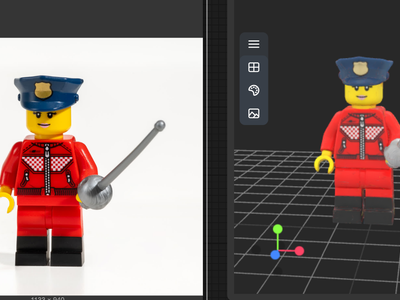

Meshy v6 for Image to 3D Model
Create a 3D model from Image using Meshy v6
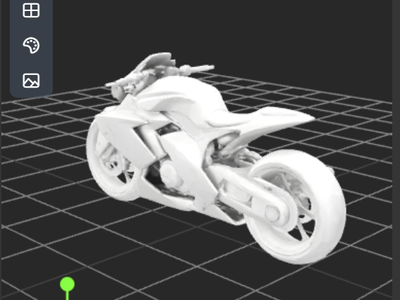
Meshy v6 Text to 3D Model
Create a 3D using Meshy v6 text to model
Run Meshy v6 online through ComfyUI on Floyo. The #1 AI 3D model generator. Text-to-3D and image-to-3D with production-ready geometry, PBR textures (metallic, roughness, normal), auto-rigging with animations, Low Poly Mode, and multi-color 3D printing (3MF). Up to 300K polygons. Export GLB, FBX, OBJ, USDZ. 2 workflows. No install, no GPU, browser-based. Free to try.