



COMMUNITY PAGE
Model Governance is now live
Admins can now decide which models and nodes their team is allowed to run, and Floyo blocks everything else before it renders.
- Every model carries two attributes: Verified Private and Commercial Use. Two toggles block anything that fails either one.
- Block individual models or nodes, one at a time or a whole provider family at once.
- Node governance covers both categories: Floyo Partner Nodes and everything else, including custom, community and GitHub nodes.
- Every model and node is reviewed before it reaches you. New models arrive already tagged.
- There is no execution path that bypasses an admin block. Canvas runs and API runs are enforced the same way, with nothing to configure per user.
Floyo runs full ComfyUI in the cloud, so studio teams share one environment where assets and IP stay private by default. Model governance decides what is allowed to run inside it.
Most of the teams we work with have strict policies about which models and nodes are permitted on client work. Until now those policies had nowhere to live except a document and a lot of trust.
So we built the controls into Floyo. Admins set the rules in the settings panel, and every run is checked against them before it executes. Nothing about it depends on an artist remembering the policy.
Two minutes on how it works, then the detail below.
Why studios need this
If you deliver client work, three questions follow you onto every job, and answering them properly is real work.
An artist loads unreleased character designs, an unannounced product, or pre-production plates into a model. Whether that provider can use the content to train depends on the specific model and on the path used to reach it. Run it in your local ComfyUI app, reach it through another platform, or call the provider's API directly, and each path can carry its own terms on training against your proprietary IP. Same model, different rules for what happens to your content.
This is usually the first question in a client security review, and it is close to impossible to answer per model, on deadline, unless someone did the license work in advance.
You own what you generate. What varies is the license terms attached to each model along the way, and nobody is running just one model. A checkpoint, a couple of LoRAs, a ControlNet, an upscaler, all pulled from different places and each carrying its own terms. Some are cleared for commercial work, some carry restrictions, and some barely have terms at all.
There are many closed source models and even more open source ones, and licenses change over time. Vetting and tracking every one is real work, the kind that an individual artist, a team, or even a full studio rarely has the time to do properly on top of production. That diligence is exactly what governance is meant to carry for you.
Custom nodes are Python packages, usually installed straight from GitHub onto your own machines, and they run with the same access as everything else in the environment. They can read and write files, reach the network, and pull their own dependencies at install time.
The realistic risk is not a malicious package. It is an artist opening a shared workflow, installing the nodes it needs in order to run it, and adding an unreviewed maintainer to the environment where client plates live. There are thousands of community packages and every one of them is a click away. Each one is a risk you take into your environment, whether that is a workstation, a laptop, or a shared server. And the downside is not limited to IP. A compromised package can reach credentials, API keys, and secrets sitting in the same place as your client work.
How Floyo tags models and governs nodes
Before the controls make sense, it helps to know what they act on.
Floyo runs two kinds of models. Closed source models like Seedance, Kling and Nano Banana are accessed via Floyo Partner Nodes, which are our direct integrations with each provider. Open source models like Wan, LTX and Z-Image are self-hosted, so they run on Floyo infrastructure and your content never leaves the environment.
Whichever kind, every model carries the same two governance attributes. The full list is public at trust.floyo.ai.
A contract or license is in place that prohibits the provider from using your content to train or improve its generative models, when the model is accessed through Floyo. Self-hosted open source models are Verified Private by default, because Floyo hosts these models ourselves and your content never leaves the environment.
The status covers use through Floyo only. Reach the same model directly from the provider and the terms may be different.
This one is about the model's own license. It means outputs generated by the model can be used for commercial purposes.
There are hundreds of node packages and thousands of individual nodes on Floyo, and every one goes through a security review before it is available, including a manual review for safety and for conflicts with other nodes. A useful side effect: nodes on Floyo are reviewed for compatibility with each other.
Governance sits on top of that review. Floyo Partner Nodes are built and maintained by Floyo as direct provider integrations. Every other node, whether custom private, community, or pulled from GitHub, can be denied by an admin, and a denied node cannot execute in any workflow in the team.
The contrast with local is the architecture itself. Every run executes in the cloud, isolated on a GPU walled off for that run. Review is the first line of defense and isolation is the second: even if a node with an issue somehow slipped past review, the exposure would be limited to the input and output files of that one run. The worst case is small by design.
The two model attributes are what the global policies act on. On Floyo, a team admin flips two toggles and every model that is not Verified Private or not cleared for commercial use is blocked, done in about a minute. Blocking also works at the individual model level, for any reason at all. Some studios block models that pass both attributes anyway, because a brand guideline or client mandate rules them out. The same goes for nodes: an admin can block any node, for any reason, independent of the models it touches. All of it is self-service for team admins. No ticket, no waiting on us. And node review happens before anything reaches your team in the first place.
Base ComfyUI has no admin, no teams, no approved list, no review. It will run anything, for anyone, every time. That is its power and its problem. Your studio's policy can be perfectly written and still enforce itself exactly zero times. Governance is the difference between a policy you wrote and a policy that runs.
| Without governance (other platforms) | With model governance |
|---|---|
| The policy is written down, but nothing enforces it | Policy lives in team settings and enforces itself on every run |
| An artist can load anything the platform offers | Blocked models are not in the selector to begin with |
| Any node can be installed straight from GitHub | Every node is security reviewed, and an admin can deny any node |
| UI restrictions do not always cover API runs | One policy covers the entire Floyo app canvas and all API traffic |
| Clearing a pipeline for production means months of work: every model, every node, every workflow reviewed, plus contracts with each provider | The license work, contracts, and security review are already done. Setting policy takes a minute and a toggle |
| Every new model release means another review | New models arrive already tagged and reviewed |
What's new
Auto-block any model that is not Verified Private, and auto-block any model that is not cleared for commercial use. Both live in Settings > Models and Nodes, under the Models and Nodes submenu that appears if you are an admin.
Turning both on is the fastest way to ensure that every model available in your team carries a no-training commitment and a commercial use license. Most teams never need to go further than this.
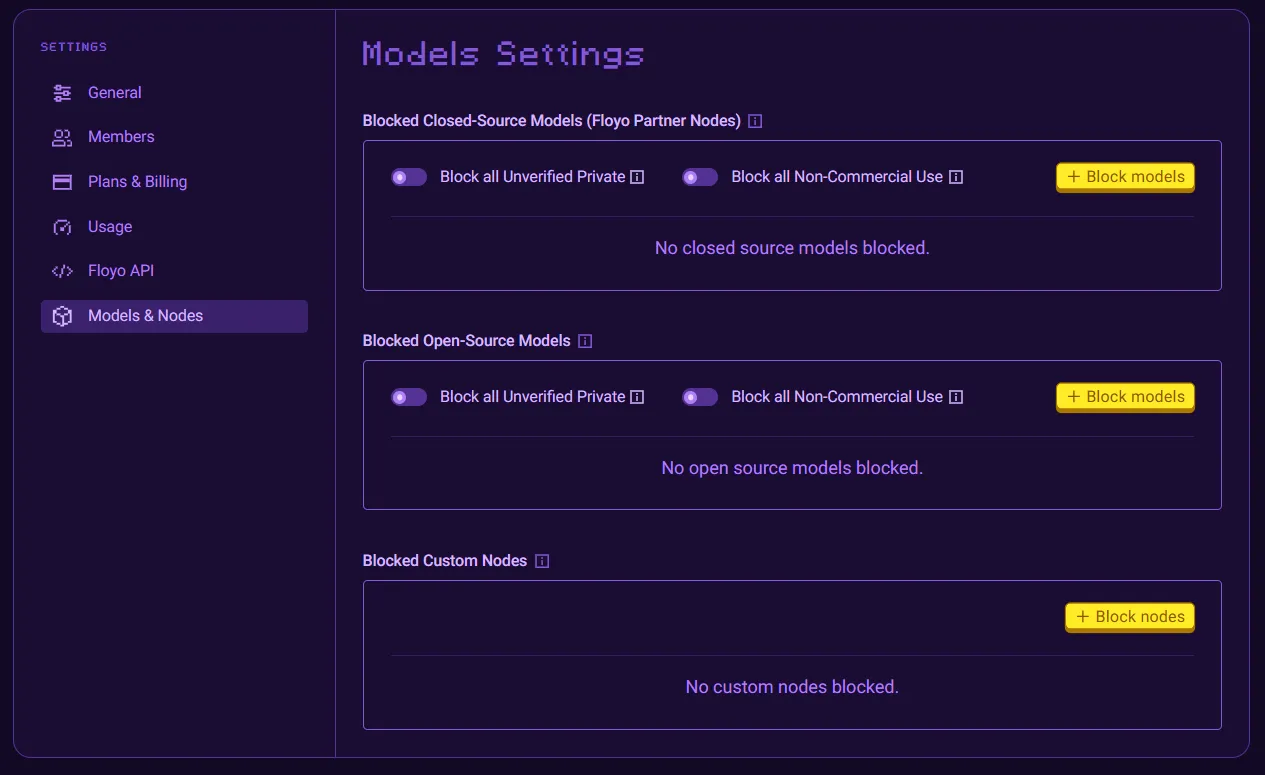
Policy toggles cover the licensing questions. Manual exclusions cover everything else. A brand guideline rules out a provider, a client mandate excludes a country of origin, or your team simply decides a model is not for them. Block the provider's entire family or a single model inside it, and leave the rest available.
Filter by blocked status, Verified Private, Commercial Use, model name or creator, then select a set of results and block them together. Unblocking works the same way. Just a quick toggle.
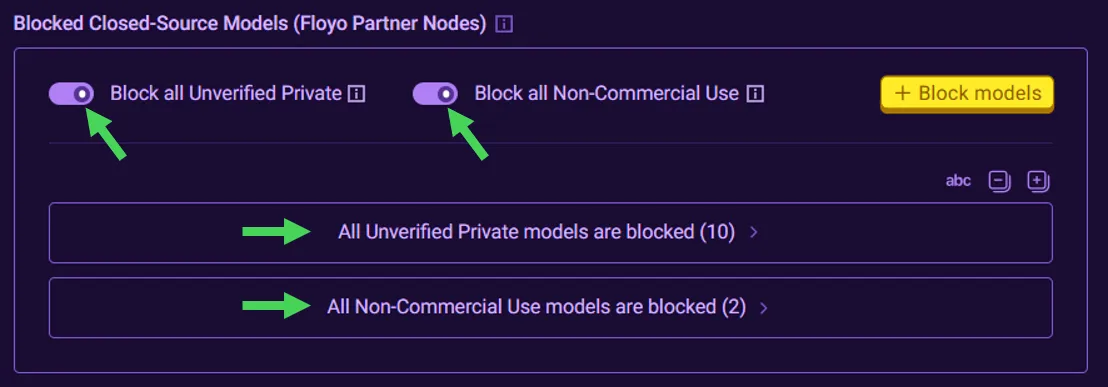
Floyo separates Partner Nodes, which are the routes to closed source models, from every other node: custom private nodes, community nodes, and nodes pulled from GitHub. Governance covers both categories.
Blocking means something different in each category. Deny a Partner Node and you are closing the route to that provider's closed source models. That is a provider-level call: a brand guideline, a client mandate, or a decision to keep generation on self-hosted open source models only. Deny a community, custom, or GitHub node and you are shaping the pipeline itself: standardizing on a known set of tooling, keeping workflows reproducible across the team, or simply a preference for one node over another. Either way, a denied node no longer executes in any workflow in that team.
Blocked models are no longer available to select, so artists never have to remember the rule. Add a blocked node to a workflow and it will not execute, with an alert naming exactly what is blocked.
Every model and node block applies to every workflow run, whether it was triggered in the UI or by an API call. There is no execution path that bypasses an admin block.
That matters most for headless, API-driven deployments. Governance set once at the team level is enforced uniformly across all API traffic, with no per-user configuration required.
Policy is scoped to a team, so you can run a discovery team with full model access and a production team locked to commercial-use models only. Same people, same platform, different rules. Agencies tend to go further and create a team per client.
FAQ
The run is blocked, from the canvas and from the API. Enforcement sits in the execution path rather than in the interface, so there is no way around it.
For closed source models accessed via Floyo Partner Nodes, the provider is contractually barred from training on your content. Access the same model directly through the provider or through another platform and different terms may apply. Self-hosted open source models qualify by default because Floyo hosts these models ourselves. We do not train on your inputs. We do not train on your IP.
Yes, and that covers both node categories: Floyo Partner Nodes, which access the closed source models, and every other node, including custom private, community, and GitHub-sourced nodes. A denied node cannot execute in any workflow in the team.
No. Policy is set once at the team level and applies to everyone in that team and to all API traffic from it. That is the point of putting enforcement at the team level rather than in every path that can trigger a run.
Yes. Studios on Floyo asked us for exactly this. The common practice is one team kept open for exploration and another scoped to a specific production, with the production team enforcing commercial use only and Verified Private.
If you want help mapping your studio's existing approved-model list onto this, we will do it with you on a call.
Talk to us Read the docsModel licenses change. The Trust Center reflects our current review and is not legal advice, so verify terms before using any model in commercial production.
Model governance for ComfyUI teams. Floyo admins block unverified and non-commercial models and custom nodes per team, enforced before anything renders.