



Découvrez d’autres cas d’usage
Tout explorer



Tous les workflows de type transfert de styleWorkflows : Transfert de style
Tous les Workflows

Grok Imagine: Edit Images with a Text Prompt
Edit any image with a text instruction using Grok Imagine. Upload a picture, describe the change, and get a side-by-side comparison back in under a second.

Wan2.1 Fun Control and Flux for V2V Restyle
Create a new video by restyling an existing video with a reference image.
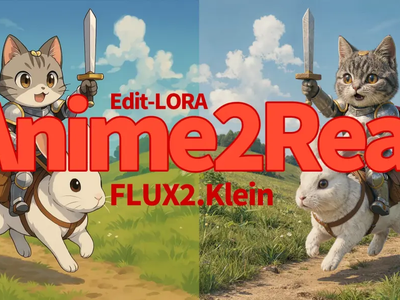

A2R for Klein
A2R Klein
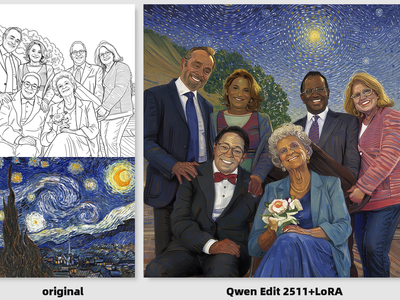
Qwen Image Edit 2511 + Style Transfer LoRA
Create new images from your lineart drawing or sketch using the style transfer LoRA and Qwen Image Edit 2511

Wan 2.1 Vid2Vid Style Transfer with Ditto
Upload any video, describe a new style, and Wan 2.1 rewrites every frame. Ditto keeps motion and structure intact across anime, Pixar, clay, and dozens more.
Wan 3.0 · Reference to Video
Re-render any video in a new visual style using Wan 3.0 by Alibaba. Upload a clip, describe the target look, and hit run. Motion preserved, audio included.


Wan 2.2 and Qwen for V2V Restyle
Create a new video by restyling an existing video with a reference image.

FLUX.2 Klein 9B · Image Editing With KV Cache
Edit images with Flux 2 Klein 9B in 4 steps. KV Cache speeds every run by reusing attention work across steps. Upload an image, describe the edit, hit Run.

LTX 2.3 IC LoRA Union Control - Video to Video
Restyle video with LTX 2.3 using IC-LoRA Union Control for structure guidance

Wan 2.7 · Image Editing
Edit any image with Wan 2.7 Unified, Alibaba's thinking-mode model. Upload a picture, describe the change, and preview the result. Thinking mode on by default.

Wan 2.7 Pro · Image Editing
Edit any image with Wan 2.7 Pro Unified, Alibaba's thinking-mode image model. Upload a picture, describe the change, and get a before-and-after comparison.

Z-Image Base · Text to Image With LoRA
Generate stylized images with Z-Image Base and a community LoRA. Write a prompt starting with the trigger word, pick a size, hit run. Apache 2.0 open weights.
Workflows = API
Chaque workflow est un endpoint d’API. Intégrez la génération par IA à votre produit sans développer de backend. Choisissez un workflow, personnalisez-le, cliquez sur « Copier l’extrait de code Floyo API », et c’est fait.

MCP
Tous les workflows de la plateforme, accessibles depuis vos propres agents et outils internes, avec les mêmes contrôles d’administration.
mcp.floyo.ai/mcp
Templates simples
Ouvrez un workflow prêt à l’emploi, lisez les instructions, changez votre entrée, cliquez sur Exécuter. La plupart des gens n’ouvrent jamais un nœud. La complexité est facultative et reste sous le capot.

Trust Center
Sachez ce qui est sûr avant que quiconque ne l’exécute. Statuts Verified Private et Commercial Use pour chaque modèle, et des contrôles d’équipe pour bloquer ceux que vous n’approuvez pas.Les administrateurs choisissent les modèles, les fournisseurs et les nœuds que l’équipe peut utiliser.

Templates simples
Ouvrez un workflow prêt à l’emploi, lisez les instructions, changez votre entrée, cliquez sur Exécuter. La plupart des gens n’ouvrent jamais un nœud. La complexité est facultative et reste sous le capot.
Trust Center
Sachez ce qui est sûr avant que quiconque ne l’exécute. Statuts Verified Private et Commercial Use pour chaque modèle, et des contrôles d’équipe pour bloquer ceux que vous n’approuvez pas.Les administrateurs choisissent les modèles, les fournisseurs et les nœuds que l’équipe peut utiliser.
Workflows = API
Chaque workflow est un endpoint d’API. Intégrez la génération par IA à votre produit sans développer de backend.Choisissez un workflow, personnalisez-le, cliquez sur « Copier l’extrait de code Floyo API », et c’est fait.
Premiers pas
Cours gratuit
ComfyUI 101
cours gratuit de Sebastian KamphCours gratuit de Sebastian Kamph
Dix leçons, d’un canevas vierge jusqu’à ControlNet. Nœuds, texte vers image, modèles, LoRA, upscaling et réglages du KSampler. Rien à installer. Chaque leçon s’exécute ici : vous terminez avec des workflows que vous avez construits vous-même.
