


PÁGINA DA COMUNIDADE
LTX 2.3 Anime Image-to-Video
Why this workflow was built
This is an LTX-only workflow. It does not use MiniMax H3, PinkCherry, an SDXL VAE, or an Illustrious text encoder. Files that share the .safetensors extension are still different model roles and cannot be exchanged arbitrarily.
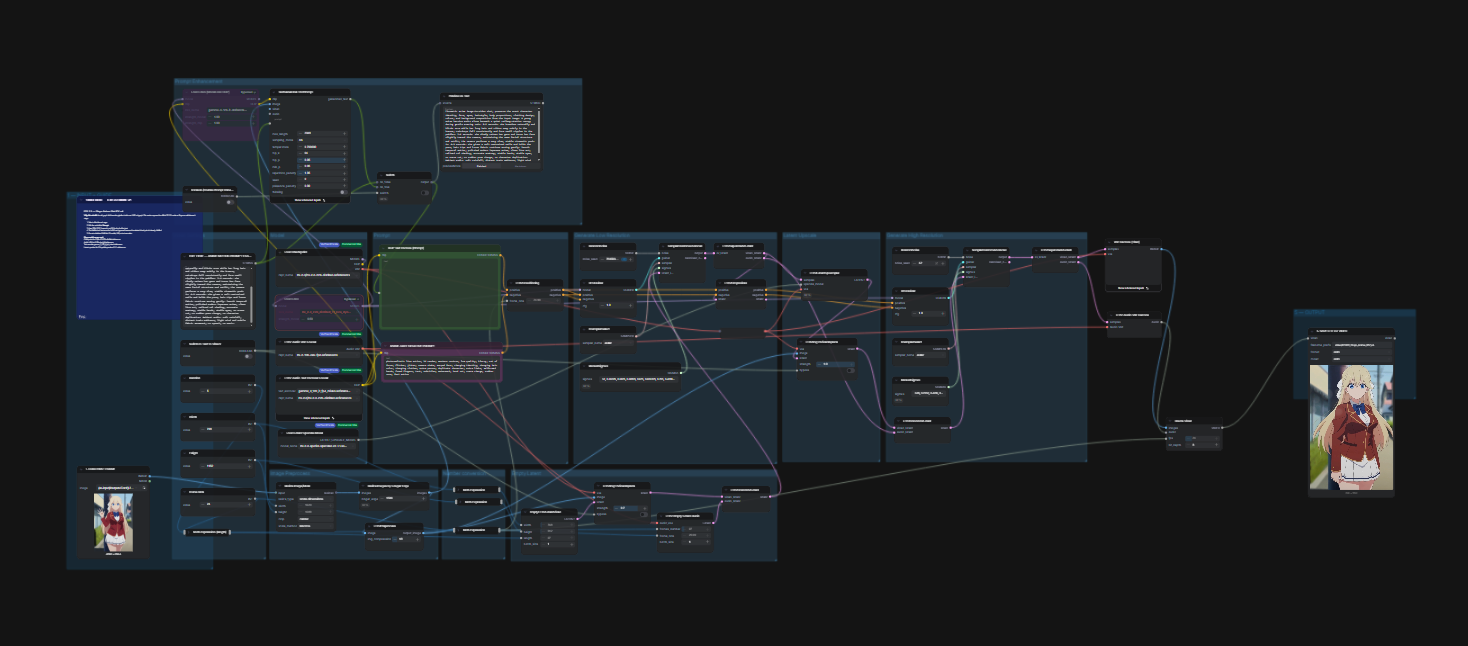
Figure 1. Complete flattened LTX 2.3 anime I2V graph with visible model, prompt, latent, sampling, decode, and output stages.
Workflow map
· Input and image preprocessing: load one anime first frame, resize safely, and prepare it for LTX conditioning.
· Model and prompt: load the Floyo-available LTX stack, encode the timeline prompt, and keep optional LoRAs bypassed.
· Low-resolution generation: create the initial audio-video latent and establish motion at low spatial cost.
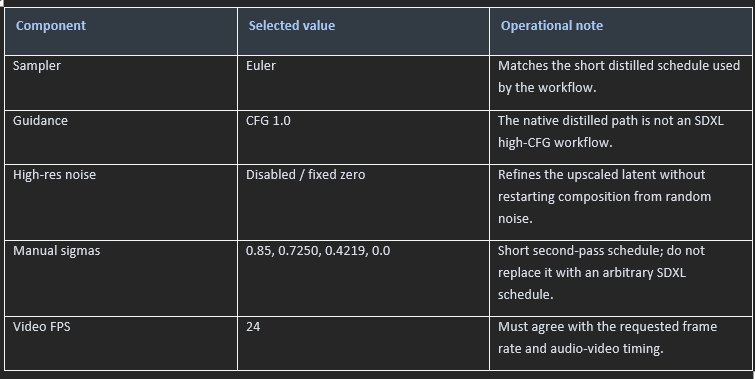
· Latent upscale and refinement: enlarge the video latent and refine it with a second short distilled sampling pass.
· Decode and output: separate video/audio latents, decode both streams, assemble at 24 fps, preview, and save.

anime animation
anime video
ComfyUI
Floyo
I2V
image to video
LTX 2.3
LTX Video
A Floyo-Native Flat Workflow with Two-Stage Latent Refinement
LTX 2.3 Anime Image-to-Video
A Floyo-Native Flat Workflow with Two-Stage Latent Refinement
Stage 1 - Choose the first frame
The input image carries most of the character identity. A clean, single-character anime frame with a visible face, readable eyes, uncropped hands, and a simple background gives the temporal model fewer ambiguities to solve. The example uses a portrait frame of one blonde school-uniform character.
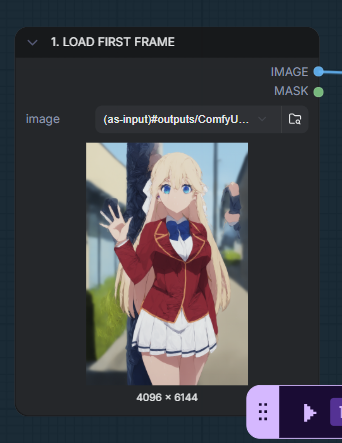
Figure 2. Load Image supplies the identity and composition anchor for the complete video.
INPUT NOTE Avoid text overlays, extreme foreshortening, tiny faces, already-blurred frames, or multiple people during the first test. Use a source aspect ratio close to the requested output ratio to reduce composition changes.
Stage 2 - Image preprocessing and latent geometry
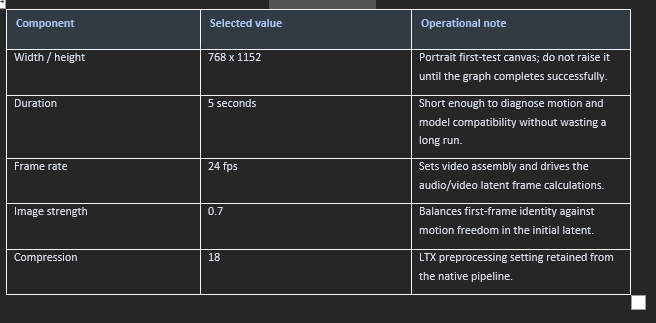
The preprocessing branch first scales the input without stretching it, then resizes by the longer edge and applies LTX preprocessing. Math nodes convert the requested duration and frame rate into valid frame counts for both video and audio latent construction.
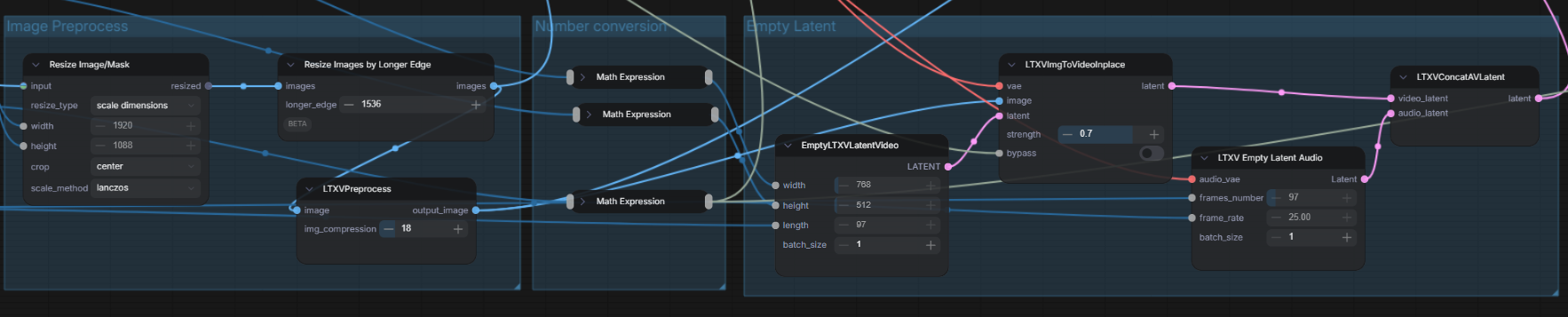
Figure 3. Aspect-preserving resize, LTX preprocessing, frame-count conversion, image conditioning, and synchronized empty audio-video latents.
Stage 3 - The Floyo-compatible model stack
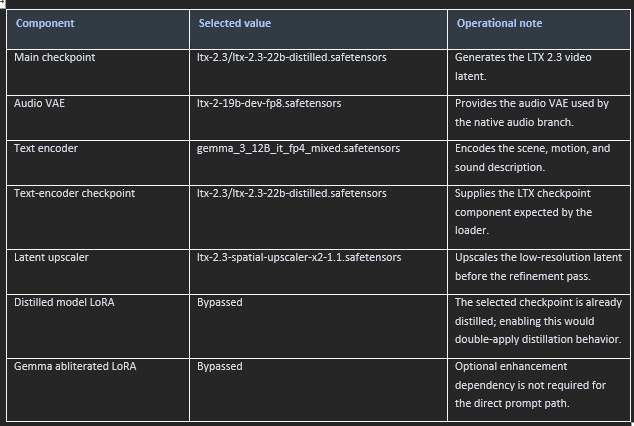
The primary checkpoint and the checkpoint passed into the audio text-encoder loader must resolve to the same installed LTX 2.3 distilled file. The audio VAE loader uses the available LTX-2 19B development checkpoint.
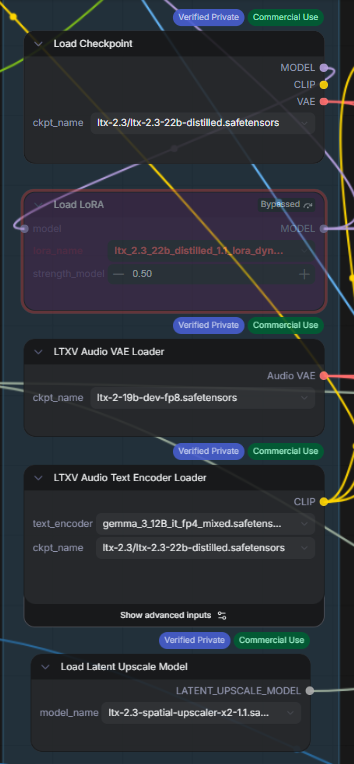
Figure 4. Floyo model selectors used by the workflow; both optional LoRA loaders remain bypassed.
Stage 4 - Write motion as a timeline
The editable Prompt primitive is the user-facing control. Do not type the main scene description into the empty positive CLIP node: the green string connection already sends the Prompt value there. The included example separates identity protection, timed motion, camera behavior, quality constraints, and audio.
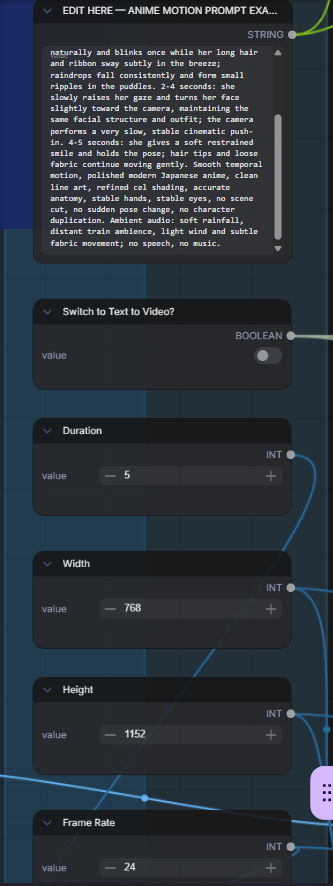
Identity lock: Preserve the exact face, eyes, hairstyle, proportions, clothing design, colors, and background composition from the input image.
0-2 seconds: Use micro-motion: natural breathing, one blink, subtle hair movement, rain, dust, leaves, or other continuous environmental motion.
2-4 seconds: Introduce one deliberate action and one slow camera move. The sample raises the gaze, turns slightly, and uses a stable push-in.
4-5 seconds: Resolve into a held pose or small expression so the shot ends cleanly instead of accelerating into a new action.
Audio: Describe ambience and sound sources explicitly. Use 'no speech, no music' when the scene should contain only environmental sound.
PROMPT RULE One main action plus one slow camera move is safer than a chain of unrelated actions. If the character changes clothes, face, or body shape, simplify the timeline before changing the sampler.
Anime-safe negative prompting
The earlier negative prompt included the generic word 'cartoon', which can suppress the intended anime style. The negative instead rejects photorealistic live action, 3D rendering, western-cartoon drift, low quality, flicker, jitter, identity changes, duplicates, malformed anatomy, visible text, hard cuts, and sudden camera motion.
Optional prompt enhancement
The prompt-enhancement branch is visible but disabled. With the Boolean switch off, the original timeline prompt passes directly to conditioning. This is the recommended diagnostic mode because it makes every generated action traceable to text the user can see.
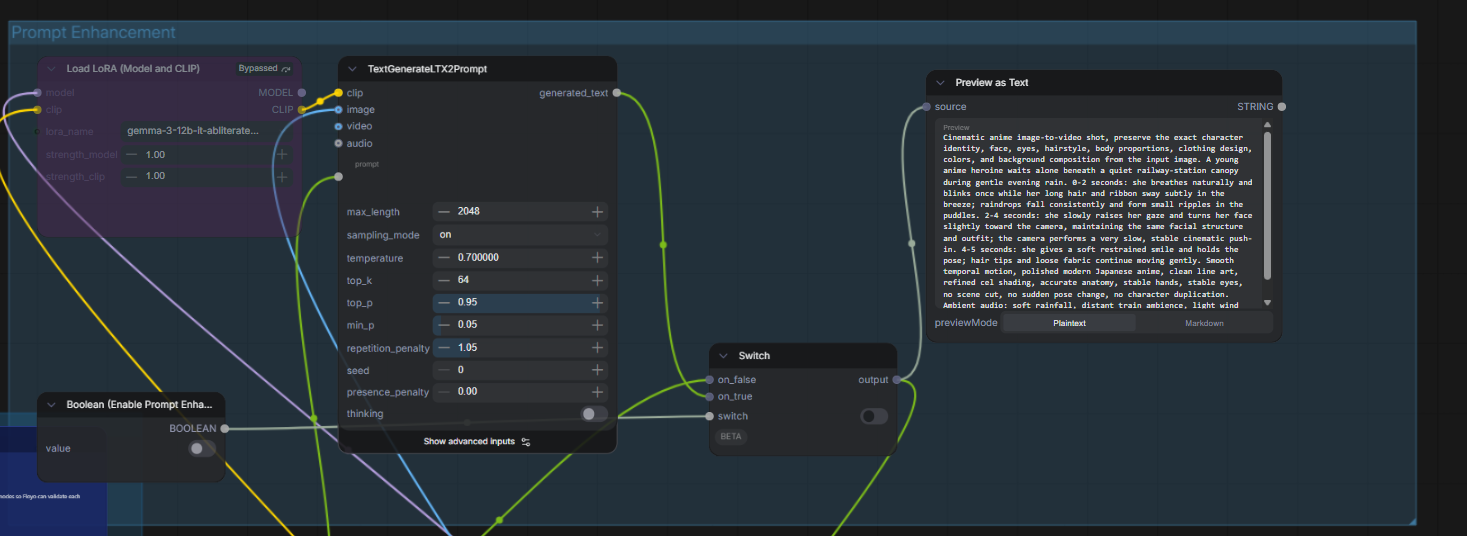
Figure 6. Optional LTX prompt generation, bypassed Gemma LoRA, Boolean switch, and text preview.
WHEN TO ENABLE Enable enhancement only after the direct prompt produces a stable video. Recheck the Preview as Text node before sampling; an expanded prompt can invent new objects, people, camera moves, dialogue, or scene changes.
Stage 5 - Two-stage distilled sampling
The graph first creates a low-resolution audio-video latent, then spatially upscales the video latent and runs a high-resolution refinement pass. This preserves motion planning while reserving expensive detail work for the enlarged latent. The output is separated into video and audio streams, decoded independently, and assembled into one video.
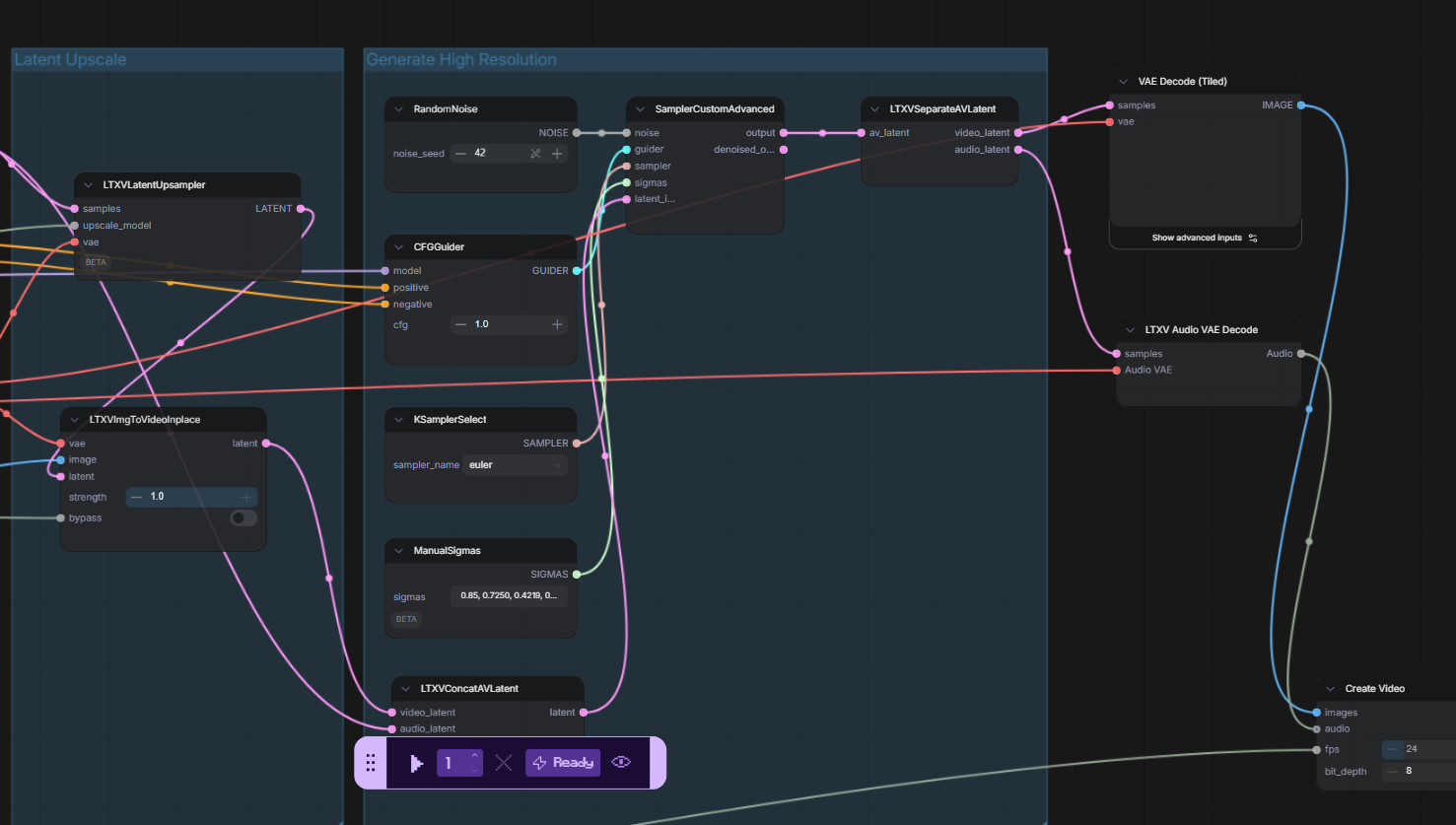
Figure 7. Latent upscale, second distilled sampling pass, separate video/audio decode, and video assembly.
Final output - the five-second anime shot
The completed run appears in the Save Video node as a five-second portrait clip. The blonde character remains recognizable from the first frame, while the generated sequence adds restrained blinking, breathing, hair movement, and the requested slow camera behavior without replacing the original costume or background composition.
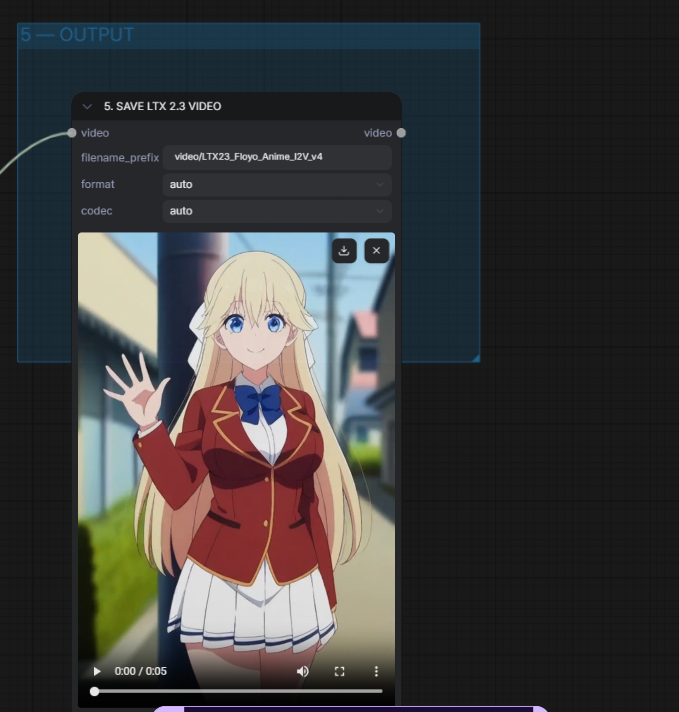
Figure 8. Final LTX 2.3 output preview inside Floyo: a five-second anime image-to-video result ready to download from the Save Video node.
RESULT CHECK Play the complete clip before publishing. Check the opening, midpoint, and final frame for face stability, hand shape, hair continuity, uniform colors, background flicker, camera smoothness, audio timing, and an exact five-second duration.
First-run procedure
1. Open this workflow in Floyo
2. Select a clean anime image in 1. LOAD FIRST FRAME.
3. Confirm the checkpoint, audio VAE, text encoder, and latent upscaler match the installed filenames.
4. Leave both LoRA nodes bypassed and leave prompt enhancement off.
5. Run the included anime timeline prompt at 768 x 1152, five seconds, and 24 fps.
6. Inspect identity, temporal smoothness, camera continuity, environmental motion, and audio before increasing cost.
Troubleshooting
Validation error: model not in list: Open the affected selector and choose the exact Floyo-installed filename. Do not type a guessed filename.
Audio VAE loader fails: Confirm it uses ltx-2-19b-dev-fp8.safetensors, not the LTX 2.3 main checkpoint field.
Character identity drifts: Use one character, shorten the action, keep the identity lock first, and lower environmental complexity.
Motion flickers or jumps: Remove fast actions, hard turns, scene changes, and aggressive camera moves; keep the five-second baseline.
Output stays too static: Add one small explicit action with a start and end state; do not merely repeat visual appearance tags.
Prompt enhancement changes the scene: Switch enhancement off and use the direct prompt. If re-enabled, inspect Preview as Text first.
Out of memory: Reduce resolution or duration first. Do not alter latent channel dimensions or mix incompatible checkpoints.
Anime becomes realistic or 3D: Keep modern Japanese anime, clean line art, and cel shading in the positive prompt; keep live action and 3D in the negative.
Output quality checklist
· The same face, eyes, hair, clothing, and body proportions survive from first to last frame.
· No duplicate person, extra limb, malformed hand, or sudden wardrobe change appears.
· Motion follows the 0-2, 2-4, and 4-5 second progression without an unrequested scene cut.
· The camera move remains slow, stable, and physically plausible.
· Background motion is continuous rather than randomly appearing and disappearing.
· Audio matches the described environment and contains no unwanted speech or music.
· The saved video uses 24 fps and plays for the requested duration.
Workflow, Customize, and Run
Start with the supplied prompt and model stack, then replace only the first-frame image and the three timeline blocks. Share the baseline output together with the input frame so as to evaluate identity retention and temporal motion directly.
Sources and technical references
· Comfy-Org LTX-2.3 model files
· LTX-Video ComfyUI nodes and example workflows
· Comfy-Org workflow templates
Have fun experimenting with this workflow! Drop your creations in the community, use code KATORI30 for your 30-day trial on Floyo, and let us know what you think!